Issue with Facebook Lead Date Not Syncing to Google Sheet via Pabbly Connect

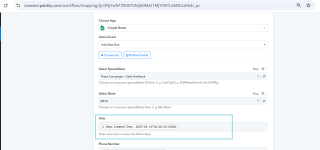
I am facing an issue with my Pabbly Connect integration. While connecting Facebook Ad Leads to Google Sheets, the lead creation date is not appearing in the sheet, even though I have correctly mapped it in the action tab during setup. All other fields are syncing properly as per the integration.
 

Preeti Paryani

Well-known member
Staff member
Hello @kaycommrealty,

Upon reviewing the mapping of the Google Sheets - Add New Row action, we noticed that the Creation Date is not mapped in this action. As a result, it is not being added to Google Sheets.

Please map the Creation Date in the required field and test the workflow. Refer to the attached image for more details. Let us know if this resolves the issue for you.

1739535494267.png
 
Thank you for your response. Upon checking, we have already mapped the Creation Date field in Pabbly. However, after completing the overall integration, it appears that the mapping was automatically removed or is not being displayed as mapped.
 

Attachments

  • Google sheet integration.png
    Google sheet integration.png
    49.1 KB · Views: 114
Hello @kaycommrealty,

The issue appears to be related to the connection. Please try setting up a new connection and let us know if this helps resolve the issue.
We have been facing this issue for the past week. During this time, we have already tried reconnecting twice, but the problem persists. Despite setting up a new connection, the Creation Date field is still not being retained in the mapping.
 

ArshilAhmad

Well-known member
Staff member
We have mapped the 'Created Time' to the Date field in the Google Sheets action step of your workflow. Please wait for a new lead to be captured from Facebook Lead Ads and check if it gets mapped correctly this time. Kindly avoid making any changes to the workflow during this period, and if the issue occurs again, please let us know.
1739551382268.png
 
Top