Kylas CRM to GeckoBoard Integration
Status: Closed · Asked by Kanchan Roy on · 0 views
I am looking to connect my Kylas CRM to GB for the data flow but there are no videos that I can find related to or will help with the integration. Is there a video available anywhere?
Hey @Kanchan Roy
As of now, Kylas CRM's video tutorials on integration are not available but we have forwarded your request to the team and they will try to add that up.
Then please guide me as to how do I connect Kylas with GB for the data to flow.
Could you clarify whether you need to receive data from Kylas CRM, synchronize data with Kylas CRM, or integrate with Google Business?
I am looking for the data to flow from Kylas CRM to Geckoboard dashboards.
Hey @Kanchan Roy
You can follow the given steps to configure the kylas CRM trigger events.
To get data from Kylas CRM using a webhook trigger, follow these steps:
1. Log in to Kylas CRM:
- Access the Kylas dashboard by logging into your account.
2. Navigate to Webhooks:
- Click on the "Settings" tab.
- Go to the "Integrations" section.
- Select "Webhooks" and then click on the "Add New Webhook" button.
3. Configure the Webhook:
- Enter a name for the webhook.
- Copy and paste the provided webhook URL into the "Request URL" field.
- Select "No Authentication required" as the authentication method.
4. Select Webhook Events:
- Under "Select Webhook Events," choose the "Task" entity and specify the events you want to capture (e.g., created, updated, or deleted).
- Click the "Save" button to apply your settings.
5. Test the Webhook:
- Click on the "Capture Webhook Response" button below the webhook settings.
- Perform a test record action (create, update, or delete a task) to ensure the webhook response is captured correctly.
6. Review and Integrate:
- Check the captured webhook response to verify that it contains the expected data.
- Integrate this data into your workflow as needed.
If you need more details or assistance with webhook configuration, consult the Kylas documentation or support resources.
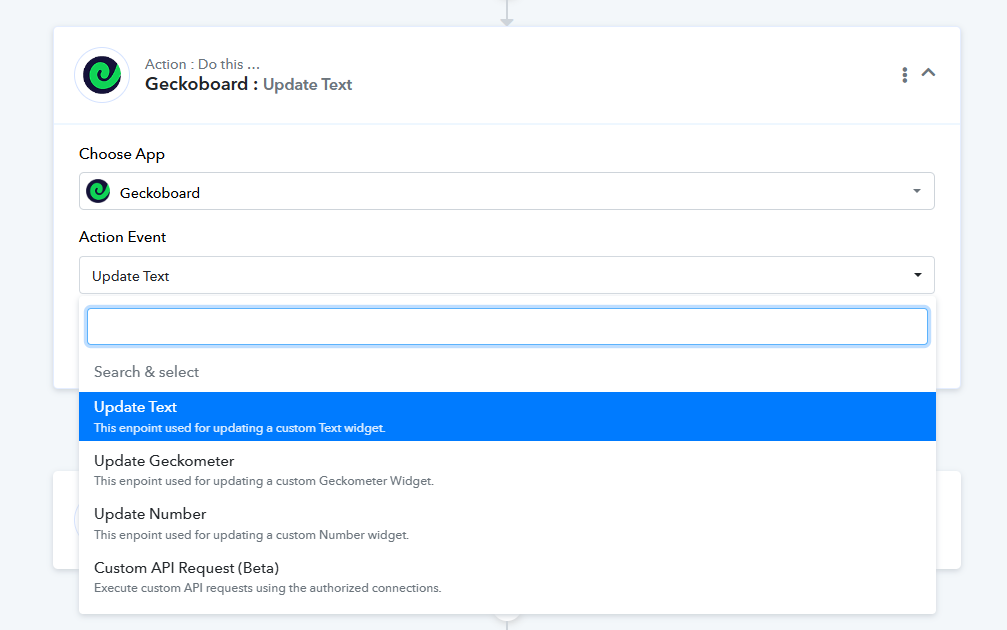
To pass the received data in Geckoboard you can opt the desired action step -
I did try the above method but there is no update in GB and I am not able to understand where exactly will the data land for viewing.
Hey @Kanchan Roy
Please create a brief video detailing your workflow, specifying the step where you encounter difficulties, and include the URL of the workflow you have already set up.