• Instructions to Ask a Question

    For any assistance, please click the "Ask a Question" button and select the Pabbly product for which you require support.

    We offer seven comprehensive applications designed to help you efficiently manage and grow your business:

    Our support team endeavors to respond within 24 business hours (Monday to Friday, 10:00 AM to 6:00 PM IST). We appreciate your understanding and patience.

  • Due to Holi celebrations, our team will have limited availability. While we’ll continue to monitor threads, responses may be slightly delayed. Normal operations will resume on Thursday, 5th March 2026.

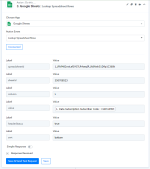
Lookup row on the google sheets integration isnt showing the inputs to select the data

tamilsak

Member
When i try to use the action event "Lookup Spreadsheet Rows" it does says "connected" but doesnt show the input boxes for me to select which value to search for.


It
Captura de tela 2022-08-30 144156.png
 

Dinamix

Member
Hi All,
Starting from today I am experiencing a similar issue with Google Sheets Look Up Rows Event.
Even though event shows as "Connected" I am not able to see the "Select Spreadsheet" and "Select Sheet" input boxes as they used to be shown in a pick list style.
Any workaround for this issue in short time?
Thank you.
 

Attachments

  • 220830GoogleSheetLookupSpreadsheetRowEvent.PNG
    220830GoogleSheetLookupSpreadsheetRowEvent.PNG
    30.6 KB · Views: 158

Neeraj

Administrator
Staff member
Hi All,
Starting from today I am experiencing a similar issue with Google Sheets Look Up Rows Event.
Even though event shows as "Connected" I am not able to see the "Select Spreadsheet" and "Select Sheet" input boxes as they used to be shown in a pick list style.
Any workaround for this issue in short time?
Thank you.

This should be be resolved now.
 
Top