soundslikemichael
Member
- Your Workflow URL
- https://connect.pabbly.com/workflow/share/CkJRY18IUzAHTQBqAGUHIFhMCg5XDgJgV05VR1NcUytUGQR_DUxcNl8TBCYET1Q1URhVP1YKVm5fSwMHAFYHdFRZU38EB10nAUwEf1QRX2wKVFF5Xz4#
- Consent to Access & Modify
- I authorize Pabbly Support to log in to my account and make changes to the specified workflow for troubleshooting.
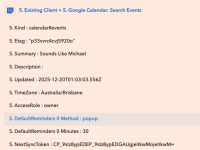
When I use the data from "Google Calendar - Search Events' inside a Router app to run a "Update Detailed Event", the Google calendar ID doesn't appear as it does when I use these in a workflow outside of a router.
The router is used to split those that already have a detailed event as current clients (to then update it) from those who don't have a calendar event and need a new one.
is there another way to run this?
See screenshot.
The router is used to split those that already have a detailed event as current clients (to then update it) from those who don't have a calendar event and need a new one.
is there another way to run this?
See screenshot.