

Missing Google Calendar ID in Router

Your Workflow URL
https://connect.pabbly.com/workflow/share/CkJRY18IUzAHTQBqAGUHIFhMCg5XDgJgV05VR1NcUytUGQR_DUxcNl8TBCYET1Q1URhVP1YKVm5fSwMHAFYHdFRZU38EB10nAUwEf1QRX2wKVFF5Xz4#
Consent to Access & Modify
I authorize Pabbly Support to log in to my account and make changes to the specified workflow for troubleshooting.
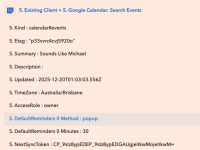
When I use the data from "Google Calendar - Search Events' inside a Router app to run a "Update Detailed Event", the Google calendar ID doesn't appear as it does when I use these in a workflow outside of a router.

The router is used to split those that already have a detailed event as current clients (to then update it) from those who don't have a calendar event and need a new one.

is there another way to run this?

See screenshot.
 

Attachments

  • Screen Shot 2025-12-25 at 9.50.19 am.png
    Screen Shot 2025-12-25 at 9.50.19 am.png
    57.8 KB · Views: 10
Use case: Client fills out a form on my website. Form data goes to Google Sheets and then creates a Google Calendar detailed event.

If the client is a new user (first time completing the form), then a new row is added in Google Sheets and new detailed calendar event is created. This part I have working.

If the user is filling out the form again (updated info) then the row is updated in Google Sheets and the Detailed Event in GC is updated.
I have set up a Router to split these two options. But when I look at the data from Search Events in Google Calendar, the Calendar ID is no longer there. I've cloned one of my other workflows that have a working calendar ID, though when I Save and Send Test Request, the Calendar ID again disappears, along with a lot of other data captured by Search Events.

Here is a link of a screen recording:
Screen Recording
 

ArshilAhmad

Well-known member
Staff member
Thank you for the detailed explanation. We clicked on Refresh Fields, then the Save & Send Test Request button in the Search Events action step, and it appears that the Event ID has now been captured.
1766702739112.png


Thanks & Regards,
Arshil Ahmad
Customer Support Associate
🌐 Pabbly.com
👉Rate your support
 
Ah thanks - I thought I had done that already but it seems not.
For this use case mentioned above, I tested what I thought was the correct flow in the Router, but the output to Google Sheets created a new row instead of updating a row = it saw the existing client (mapped via email) as a new client.
 

Preeti Paryani

Well-known member
Staff member
Hello @soundslikemichael,

Could you please share a short screencast demonstrating the issue you are facing? This will help us better understand the exact workflow behavior.

Alternatively, you may run a fresh test and share the relevant task history execution where the Google Sheets row is getting created instead of updated. Reviewing the task history will give us a clearer understanding of how the workflow is executing and where the logic may need adjustment.

Once we have this, we will be able to assist you more accurately.
 
Top