sebwilliams
Member
Hey folks,
Following up on this original thread: https://forum.pabbly.com/threads/monday-com-issue.21695/
It seems when using "Update Item Column Value" the list of columns can be returned and used perfectly
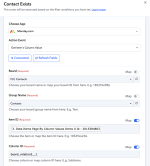
However, we're not trying to update an action on "Get Items Column Value" and the list of columns is coming back blank/empty
So it's working in some places, but not all unfortunately
Following up on this original thread: https://forum.pabbly.com/threads/monday-com-issue.21695/
It seems when using "Update Item Column Value" the list of columns can be returned and used perfectly
However, we're not trying to update an action on "Get Items Column Value" and the list of columns is coming back blank/empty
So it's working in some places, but not all unfortunately