Nested "response" array from LeadSquared webhook resolves empty on LIVE runs (works in test) — Iterator outputs []

Status: Closed · Asked by Jugal Popat on · 0 views

Jugal Popat — Question ·
Hi team,

I'm connecting LeadSquared → Pabbly → an external API. The trigger is a
webhook catching LeadSquared's "Lead Activity Creation (WhatsApp Message)"
event. The payload contains an array under "response", e.g.
response[0].RelatedProspectId.

THE CORE PROBLEM
Everything maps and passes in the builder's "Save & Send Test Request", but
on LIVE runs, any reference to a field inside the "response" array resolves
to empty. The trigger's own Data Out clearly shows the data is present on
live runs — it's only the downstream binding that comes through empty.

WHAT I'VE TRIED (all fail the same way on LIVE, all pass in test):
1. Filter on response[0].RelatedProspectId "Is not empty"
   → live Data Out: Status: error, Message: "Condition is false"
2. LeadSquared "Get a Lead by ID", Lead ID mapped to RelatedProspectId
   → live: Failed (422) "Required field Lead ID missing"
3. Iterator (Process Arrays) pointed at the "response" array
   → live: Success (200) but Data Out → Output: []  (empty), workflow stops
   (In the builder test the Iterator outputs the fields correctly.)

CONFIRMED DETAILS
- Trigger Response Format tried in both Simple and Advance.
- On live runs, the Trigger's Data Out DOES contain the data, e.g.:
    EventType: LeadActivity_Post_Create
    EntityType: Webhook
    Response 0 RelatedProspectId: 19b309cd-c09b-4df0-a3dd-0fc4dc2862a4
    Response 0 ActivityEventName: WhatsApp Message
- The webhook is genuinely triggered by the source app on live runs
  (Trigger shows Success on every live execution in Task History).
- Your support suggested a "Data Transformer → JSON Parse" step, but Data
  Transformer has NO JSON-parse event. Its full event list is: Line Itemizer,
  Wix Instance ID Extractor, WooCommerce Meta Data Extractor, Gmail, ClickBank,
  Base64 Encode, Strip HTML Tags, HMAC-SHA256, HTML Decode, MD5, Pabbly Custom
  Encode, SHA1, Base64 Decode, SHA256, SHA512, Facebook Leads Ad, Bettermode
  Guest Access Token, Zerodha Access Token. None parse a JSON string into an
  iterable array.

MY QUESTION
What is the exact, supported way to read/iterate fields from this nested
"response" array on LIVE runs? Specifically:
- Is the "response" array arriving as a STRING on live (so the Iterator sees
  no array)? If so, what exact app + event converts it to a real array?
- Should I use "Code by Pabbly" (JavaScript JSON.parse) instead? If so, can
  you confirm the correct input mapping (raw_data vs response) that will
  actually bind on live?
- Or is this a known limitation with LeadSquared's webhook array format?

I can share screenshots of the live Task History (Iterator Output: []) and the
Trigger Data Out (RelatedProspectId populated) on request.

Thanks!
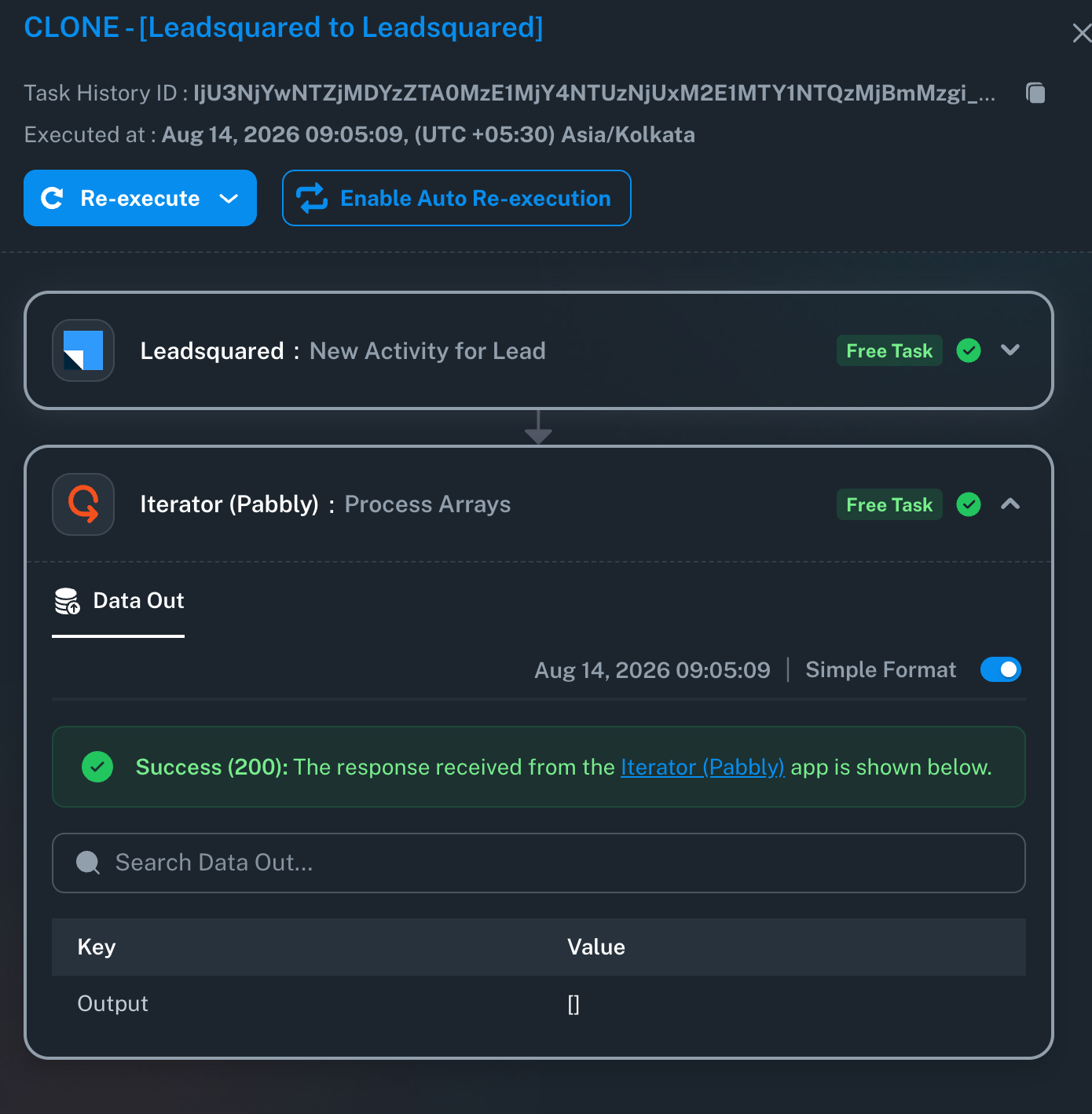
image.png
Pabbly Support — Reply ·

Hello Jugal,

Thank you for your patience!

We checked the backend, and the issue causing the response format to revert has now been resolved.

Could you please test your workflow again by sending a fresh live event from LeadSquared and let us know if the nested array maps and iterates as expected?

If you encounter any further issues, please let us know!

Thanks & Regards,
Hrishabh
Customer Support Associate
🌐 Pabbly.com
👉 Rate your support

Signature image

Jugal Popat — Reply ·

Pabbly Support:
Hello Jugal,Thank you for your patience!We checked the backend, and the issue causing the response format to revert has now been resolved.Could you please test your workflow again by sending a fresh live event from LeadSquared and let us know if the nested array maps and iterates as expected?If you

Tested again after your backend fix: set trigger to Simple format,

re-captured, deleted the Iterator, and mapped Get-Lead's Lead ID directly to

response[0].RelatedProspectId (shown as "response 0 RelatedProspectId").

On LIVE runs it STILL fails: Get-Lead → Failed (422) "Required field Lead ID

missing", and Data In shows Lead ID empty. So the nested "response" array

value is still not binding on live, even with the direct Simple mapping and

no Iterator. Task History ID: (the 11:09 run).

Jugal Popat — Reply ·

task history id: IjU3NjYwNTZjMDYzZTA0M2Q1MjZkNTUzNDUxM2E1MTZiNTQzNDBmMzAi_pc

Pabbly Support — Reply ·

Hello Jugal,

Thank you for reaching out to us and for sharing the detailed information.

We checked your account, but we are unable to find a task history with the ID you provided.

Could you please share the correct Task History ID so that we can check the execution and assist you further with the issue?

Thanks and Regards,
Preeti Paryani
Customer Success Associate,
Pabbly.com

Signature image
Pabbly Support — Reply ·

Hello Jugal,

Thank you for your response.

To help our technical team investigate why the mapping is failing on live runs, could you please re-check and provide the Task History ID?

The ID you shared (IjU3NjYwNTZjMDYzZTA0M2Q1MjZkNTUzNDUxM2E1MTZiNTQzNDBmMzAi_pc) is not registering in our system logs.

To locate it:

  1. Open your workflow's Task History tab.

  2. Click on the failed live execution.

  3. Copy the full Task History ID from the top of the execution log.

Once we have the valid ID, we will check the backend logs right away.

Thanks & Regards,
Hrishabh
Customer Support Associate
🌐 Pabbly.com
👉 Rate your support

Pabbly Support — Reply ·

Hello,
We noticed that we haven’t received a response regarding your query.
As there has been no update, we are closing this support ticket for now. If you still need assistance, please feel free to open a new ticket, and we’ll be happy to help.
We would also greatly appreciate it if you could share your feedback on your support experience using the following link: https://bit.ly/3V2Pjia
Thank you for choosing Pabbly!

Thanks & Regards,
Hrishabh
Customer Support Associate
🌐 Pabbly.com
👉 Rate your support

Back to all forum threads · Log in to reply