


aagrawal
Member
Hi everyone,
I have a simple workflow with a trigger of new file in a Google Drive folder and then action of upload to dropbox folder. I added a new file into the Google Drive folder. The Workflow triggered and completed with no errors, but the file did not get uploaded to the Dropbox folder.
I used "SelfLink" as the File URL in the Dropbox action step. Obviously, that "SelfLink" was for the file that I had added to the Google Drive folder when creating the Workflow. Not sure if the issue is related to what needs to be chosen as File URL.
Appreciate any guidance.
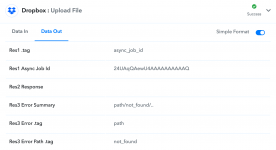
Edited/Updated: Actually I see some info under "Data Out" tab of Dropbox step that seems to be some error info related to path not found, but not sure why the path is not found. Screenshot attached.
Thank you,
Anil
I have a simple workflow with a trigger of new file in a Google Drive folder and then action of upload to dropbox folder. I added a new file into the Google Drive folder. The Workflow triggered and completed with no errors, but the file did not get uploaded to the Dropbox folder.
I used "SelfLink" as the File URL in the Dropbox action step. Obviously, that "SelfLink" was for the file that I had added to the Google Drive folder when creating the Workflow. Not sure if the issue is related to what needs to be chosen as File URL.
Appreciate any guidance.
Edited/Updated: Actually I see some info under "Data Out" tab of Dropbox step that seems to be some error info related to path not found, but not sure why the path is not found. Screenshot attached.
Thank you,
Anil
Attachments
Last edited:


