• Instructions to Ask a Question

    For any assistance, please click the "Ask a Question" button and select the Pabbly product for which you require support.

    We offer seven comprehensive applications designed to help you efficiently manage and grow your business:

    Our support team endeavors to respond within 24 business hours (Monday to Friday, 10:00 AM to 6:00 PM IST). We appreciate your understanding and patience.

  • Due to Holi celebrations, our team will have limited availability. While we’ll continue to monitor threads, responses may be slightly delayed.

Payment Error

profunnel

Member
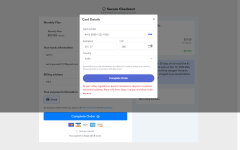
Hi, at the time of making the payment it gives an error saying - As per Indian regulations, export transactions require a customer name and address. What to do?
 

Attachments

  • screencapture-payments-pabbly-subscribe-634e42a3564dd211f71da4a5-monthly-plan-2022-10-18-13_15...png
    screencapture-payments-pabbly-subscribe-634e42a3564dd211f71da4a5-monthly-plan-2022-10-18-13_15...png
    167.4 KB · Views: 139
P

PabblyMember2

Guest
Hello Sachin,

You need to enable the full billing address on the checkout page, go to the Plan-> Checkout Customizer -> Click on Billing address & enable the Street, City, and Zip Code along with the Country & State as it is necessary fields according to the Indian Regulations.

Also, it is advised to check with your bank whether the cards support recurring payments or not.
 
Top