
PayPal webhook events are required to be set up to get properly updated subscription related transactions in the PSB application. By default PayPal webhook events are set up by the PSB application itself, If not already set up, you need to set it up manually.
To setup PayPal webhook events for the PSB application, follow the below steps:
 Login to https://developer.paypal.com/ account.
Navigate to the Apps & Credentials menu.
Click on your created App name if not already created, then create an App.

Under the App, click on Add Webhook button.

Under the webhook setting, Enter https://payments.pabbly.com/api/events/paypal in the Webhook Url field.
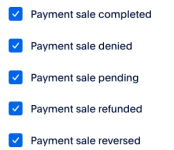
Check to mark the below webhook event names:

Click on the save button.
To setup PayPal webhook events for the PSB application, follow the below steps:
Login to https://developer.paypal.com/ account. Navigate to the Apps & Credentials menu. Click on your created App name if not already created, then create an App. Under the App, click on Add Webhook button. Under the webhook setting, Enter https://payments.pabbly.com/api/events/paypal in the Webhook Url field. Check to mark the below webhook event names:- Billing subscription cancelled
- Billing subscription re-activated
- Billing subscription suspended
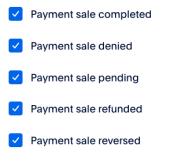
- Payment sale completed
- Payment sale denied
- Payment sale pending
- Payment sale refunded
- Payment sale reversed
Click on the save button.Attachments
Last edited by a moderator:


