

Task history filter

Hi, when I want to filter task history, how could I change the filtering condition, i.e. "Equals to" by "Does not equal"?, i.e. to see all the workflows that are not "prue".
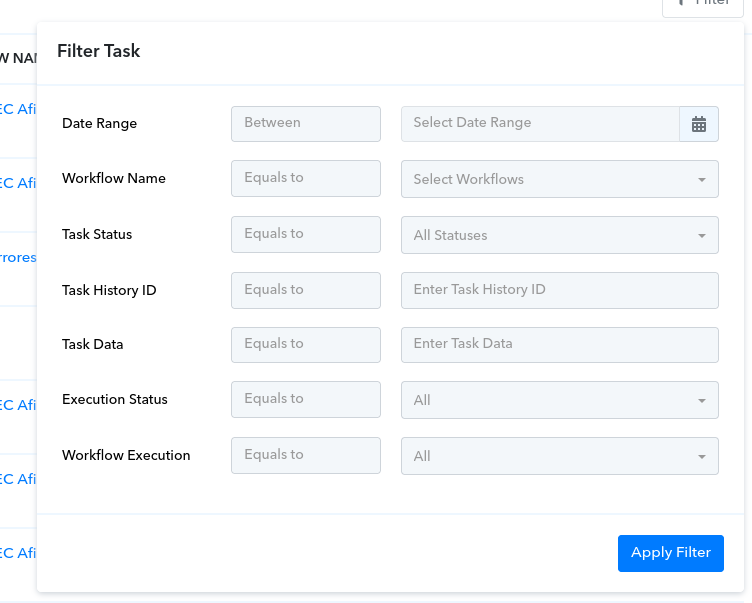
1694283015919.png

In the Task data, there are lots of fields shown as a table. How this data is supposed to be passed to the filter? How can i filter by a specific data i.e. a specific payment intent?

1694283334404.png
 

ArshilAhmad

Well-known member
Staff member
Hi @javiermarcon,

Hi, when I want to filter task history, how could I change the filtering condition, i.e. "Equals to" by "Does not equal"?, i.e. to see all the workflows that are not "prue".
Currently, changing the filtering condition to "Does not equal" is not possible in Task History. If you want this feature to be added to Pabbly Connect you can submit your request on our dedicated platform: https://pabbly.hellonext.co/

In the Task data, there are lots of fields shown as a table. How this data is supposed to be passed to the filter?
Could you please elaborate a bit more on this concern?

How can i filter by a specific data i.e. a specific payment intent?
In the Task History, you can select the Workflow Name and enter the Payment Intent in the Task Data field; this should provide you with all the tasks that contain that specific field.
1694373862212.png
 
Top