i4Investments
Member
- Grant Account Access for Support
-
- I authorize the Pabbly Support Team to access my account for troubleshooting purposes.
- WhatsApp Number
- 8097041177
- Email Address
- [email protected]
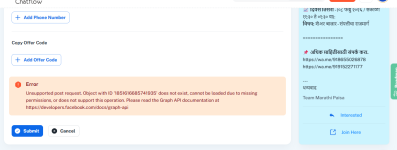
We have subscribed to the paid plan today and tried to add the first template but same error is displaying every time. We have tried multiple times with different diferent messages but still same error is occuring. Please let us know What is the issue behind this error and how to solve that.
Error
Unsupported post request. Object with ID '1851616685741935' does not exist, cannot be loaded due to missing permissions, or does not support this operation. Please read the Graph API documentation at https://developers.facebook.com/docs/graph-api
=======
My Template content is as follow for your reference.
Dear {{Name}},
Congratulations! You have Successfully Registered for Smart Investor 3-Days Free Online MasterClass. Your Seat is Confirmed, and We’re Excited to Have you Join us.
 IMPORTANT STEPS
 Add this event to your calendar
Join from a laptop/desktop for the best experience
Keep a notebook handy for key takeaways
We’ll also send you a reminder emails with joining link before the session, so stay tuned.
Looking forward to seeing you LIVE!
---
Cheers,
Error
Unsupported post request. Object with ID '1851616685741935' does not exist, cannot be loaded due to missing permissions, or does not support this operation. Please read the Graph API documentation at https://developers.facebook.com/docs/graph-api
=======
My Template content is as follow for your reference.
Dear {{Name}},
Congratulations! You have Successfully Registered for Smart Investor 3-Days Free Online MasterClass. Your Seat is Confirmed, and We’re Excited to Have you Join us.
IMPORTANT STEPS Add this event to your calendar Join from a laptop/desktop for the best experience Keep a notebook handy for key takeawaysWe’ll also send you a reminder emails with joining link before the session, so stay tuned.
Looking forward to seeing you LIVE!
---
Cheers,