Urgent – Delay Until timing mismatch and WhatsApp API message stuck in queued status
Status: Open · Asked by Bidesh Bhowmick on · 0 views
Hi Pabbly Support Team,
I need technical assistance with a Pabbly Connect workflow that uses a Delay (Pabbly) step followed by a WhatsApp API action.
Issue 1 – Delay Until / execution time mismatch
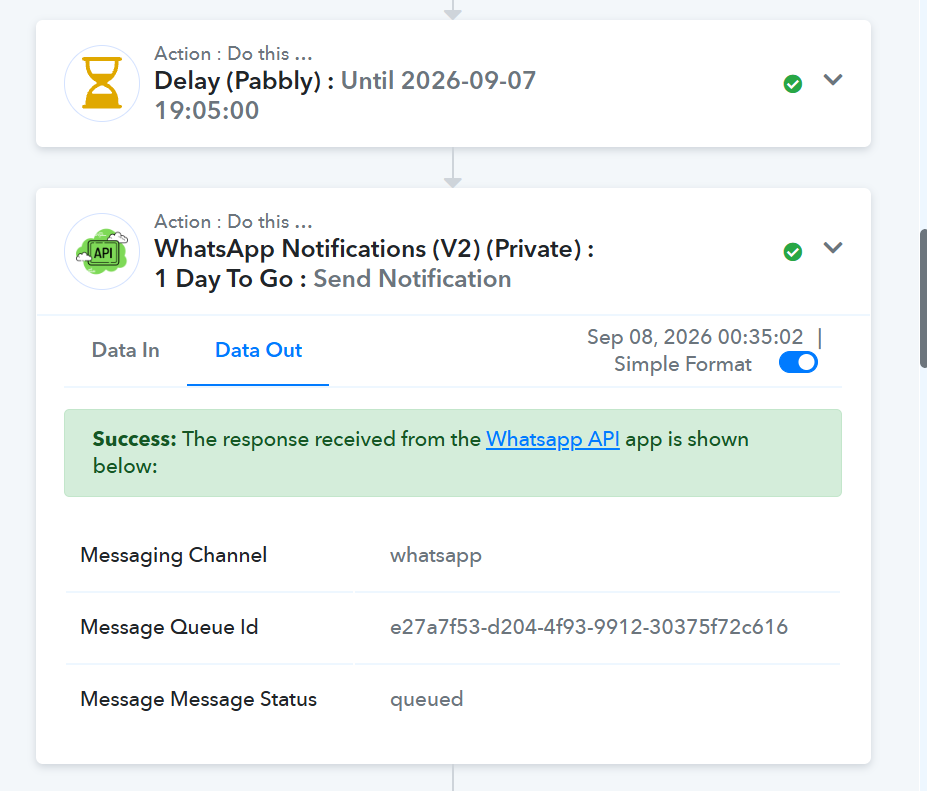
In the workflow, the Delay step shows:
Delay Until: 2026-09-07 19:05:00
However, the next WhatsApp action shows an execution timestamp of:
2026-09-08 00:35:02
There is an exact 5 hours 30 minutes difference between these timestamps.
Please confirm whether Pabbly is displaying the Delay Until timestamp in UTC while the task execution timestamp is being displayed in IST, or whether there is another timezone/configuration issue.
I need the workflow to execute the next step at the intended scheduled time, not 5 hours 30 minutes later.
Issue 2 – WhatsApp API action remains queued
The next action is:
WhatsApp Notifications (V2) (Private) → 1 Day To Go → Send Notification
The API response is successful, but it shows:
Messaging Channel: whatsapp
Message Queue ID: e27a7f53-d204-4f93-9912-30375f72c616
Message Status: queued
The API being used is https://v3.wa.team/
Please investigate whether:
- Pabbly executed this action at the correct time.
- The 5:30 difference is purely a timezone conversion.
- Pabbly actually sent the request to the WhatsApp API at the expected time.
- The WhatsApp API accepted the request but kept it in its own queue.
-
The
queuedstatus is expected behavior or indicates a delivery problem. - There is any issue with the Pabbly WhatsApp integration/action that could cause delayed delivery.
Important: I don't want a generic documentation answer. Please check the actual task execution/logs for this workflow and the specific Message Queue ID above.
If necessary, please access the workflow/task history and identify exactly where the delay occurred — whether inside Pabbly Delay, during Pabbly execution, or inside the WhatsApp API queue.
I would also like to connect with a live human support agent/technical support representative, rather than an AI/chatbot, because this requires checking the actual execution logs and determining the root cause.
Please provide the exact correction required so that future scheduled WhatsApp messages are sent at the intended time.
I have attached the screenshot showing the Delay Until timestamp and the WhatsApp API response.
Thank you.
At what exact timestamp did Pabbly make the API request to v3.wa.team, and what timestamp did v3.wa.team return for the message being queued? Please distinguish Pabbly's execution time from the WhatsApp API's actual delivery time.”
Hello Bidesh,
Thank you for reaching out to Pabbly Support.
Here is the breakdown of the two issues you reported:
Delay Until Timing Mismatch: The Delay (Pabbly) step processes and interprets input date/time values in UTC (Coordinated Universal Time). Since the Task History displays timestamps according to IST (Indian Standard Time, UTC+5:30), the exact 5 hours and 30 minutes offset is a timezone conversion difference rather than an execution delay. To ensure your workflow delays until your desired local time, please pass the date/time in UTC format or adjust the timestamp accordingly before passing it into the Delay step.
WhatsApp API Message "Queued" Status: When Pabbly Connect executes the WhatsApp API action and receives a successful response with
Message Status: queuedalong with aMessage Queue ID, it indicates that Pabbly successfully delivered the API request tov3.wa.teamat the scheduled execution time. Once handed off, the queued status is generated directly by the third-party WhatsApp provider as they process the message for delivery. For updates on queued messages, you can share the Message Queue ID (e27a7f53-d204-4f93-9912-30375f72c616) directly withv3.wa.teamsupport.
Please let us know if you have any additional questions!
Thanks & Regards,
Hrishabh
Customer Support Associate
🌐 Pabbly.com
👉 Rate your support
I have give you access to the webhook and task history can you check and confirm?