Workflow is working even after it's shut.

Hrishabh.pabbly

Member
Staff member
Hello @QuickSell ,

We’ve reviewed the workflow you shared with us, "Calendly Zoho," and noted that the Zoho CRM action used in this workflow is “Search Module Entry.”

Upon checking the task history, we can confirm that:
  • The workflow is currently turned off
  • It has not been triggered recently, and therefore is not impacting Zoho CRM
However, we also noticed that there are other active workflows in your account that could be sending data to Zoho CRM — potentially with the source name "FACEBOOK_ADS." These may be contributing to the behavior you're seeing.

To help you further, we recommend checking the following:
  • Any workflows that have Zoho CRM actions like Create/Update Lead or Contact
  • Whether any of them include a static or mapped value for "FACEBOOK_ADS" in the source field
If you'd like, feel free to share the names or links of any workflows you suspect, and we’ll be happy to review them for you.

 

QuickSell

Member
Hello @QuickSell ,

We’ve reviewed the workflow you shared with us, "Calendly Zoho," and noted that the Zoho CRM action used in this workflow is “Search Module Entry.”

Upon checking the task history, we can confirm that:
  • The workflow is currently turned off
  • It has not been triggered recently, and therefore is not impacting Zoho CRM
However, we also noticed that there are other active workflows in your account that could be sending data to Zoho CRM — potentially with the source name "FACEBOOK_ADS." These may be contributing to the behavior you're seeing.

To help you further, we recommend checking the following:
  • Any workflows that have Zoho CRM actions like Create/Update Lead or Contact
  • Whether any of them include a static or mapped value for "FACEBOOK_ADS" in the source field
If you'd like, feel free to share the names or links of any workflows you suspect, and we’ll be happy to review them for you.

Hi!
I have checked almost all the ZOHO CRM related Actions with FACEBOOK_ADS in it. Can you please also check from your side. I have looked around 2 days already. Please help us here.
 

Hrishabh.pabbly

Member
Staff member
Hello @QuickSell ,

Thank you for your patience.

We’ve checked your account and reviewed several workflows where the action is set to Zoho CRM: Create/Update Record. However, we only found entries where the Source Name field contains values like “facebook”, not “FACEBOOK_ADS” specifically.

To help us narrow this down further, could you please let us know:
  • In which Google Sheet or module you’re seeing “FACEBOOK_ADS” as the source name?
  • Any specific workflow name or record sample where this appears?
Once we have this information, we’ll be able to assist you more accurately.
 

QuickSell

Member
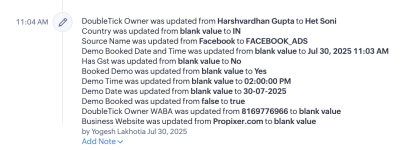
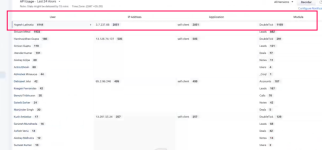
Hey, so basically this appears on Zoho Module "DoubleTick" AKA CustomModule4. I am attaching a file for reference. Also, I did check with the Zoho team on this I have been able to get an IP Address if that helps.
 

Attachments

  • 1753863491851.png
    1753863491851.png
    133.5 KB · Views: 51
  • Screenshot 2025-07-25 at 5.55.14 PM.png
    Screenshot 2025-07-25 at 5.55.14 PM.png
    334.8 KB · Views: 52

Preeti Paryani

Well-known member
Staff member
Hello @QuickSell,

Sorry for the delayed response.

Please let us know a convenient time for you to join us over a Google Meet between Monday to Friday, during either of the following time slots:
  • 11:00 AM – 1:00 PM IST
  • 4:00 PM – 5:00 PM IST
Let us know your preferred time so we can schedule the meeting accordingly to assist you better.
 
Top