Due Date for Google Task missing Time

Status
Not open for further replies.
Your Task History ID
None - building the workflow now.
I'm working on an integration to copy Google Tasks to Google Calendar.

I created a test task in Google Task due at 6pm EST today.

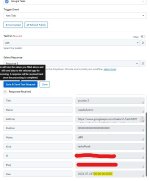
When I get that Task through the Google Task in my Workflow, I only get the date, never the time:L

1721054845566.png


This creates the problem in that the task is always created on the Google Calendar at the wrong time.
 

Luis_Bol

Member
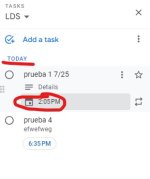
It seems I am missing something here. Also, I tried to create this automation and the due date is loaded without time - I mean it loads it as 00:00:00.
Is there a way to get the time as part of the information?
Thanks!
 

Attachments

  • Captura de pantalla 2024-07-24 092413.jpg
    Captura de pantalla 2024-07-24 092413.jpg
    68.8 KB · Views: 106
P

Pabblymember11

Guest
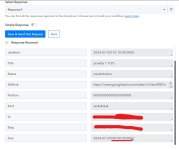
It seems I am missing something here. Also, I tried to create this automation and the due date is loaded without time - I mean it loads it as 00:00:00.
Is there a way to get the time as part of the information?
Please share the workflow URL where you have attempted this, and if you have selected 12 AM, it should appear as 00:00:00 in the time section of the due field.
 

Luis_Bol

Member

Attachments

  • Captura de pantalla 2024-07-25 111034.jpg
    Captura de pantalla 2024-07-25 111034.jpg
    13.4 KB · Views: 99
  • Captura de pantalla 2024-07-25 111308.jpg
    Captura de pantalla 2024-07-25 111308.jpg
    79.7 KB · Views: 96
P

Pabblymember11

Guest
Hey @Luis_Bol

It seems that Google Tasks provides the due date and time in the UTC timezone, which leads to a time difference.

To address this issue, it is recommended to utilize the Date Time Formatter action step, which can adjust the date and time to your specific time zone.

1721970784574.png
 
Status
Not open for further replies.
Top