• Instructions to Ask a Question

    For any assistance, please click the "Ask a Question" button and select the Pabbly product for which you require support.

    We offer seven comprehensive applications designed to help you efficiently manage and grow your business:

    Our support team endeavors to respond within 24 business hours (Monday to Friday, 10:00 AM to 6:00 PM IST). We appreciate your understanding and patience.

    🖤 BLACK FRIDAY DEALS ARE NOW LIVE! 🖤

    🔥 Enjoy an exclusive 10% discount on our LTD Plan — first-time ever offer!

    🚀 Unlock the Pabbly Plus Unlimited Yearly Plan and get unlimited access to every Pabbly application at a truly unbeatable Black Friday price.

    👉 Grab the Black Friday Offer

Fluent Booking Error

Private Comment
This field is visible only to staff members and is for their reference only.

Estevez96

Member
Your Workflow URL
https://connect.pabbly.com/v2/app/workflow/mapping/IjU3NjYwNTY0MDYzZTA0MzM1MjZiNTUzZDUxMzEi_pc
Your Task History ID
https://connect.pabbly.com/task/history?filter_status=applied&filter_by_task_id=IjU3NjUwNTZhMDYzMDA0M2M1MjZiNTUzMDUxMzU1MTY3NTQzNDBmMzki_pc
Consent to Access & Modify
I authorize Pabbly Support to log in to my account and make changes to the specified workflow for troubleshooting.
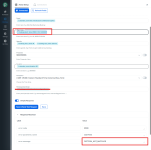
Hello. I am requesting help with this error message. I've included a screenshot of my setup and the error email details below. Thanks in advance for your help!


This email is to notify you that for the workflow "Fluent Booking >> Zoho Meet" , a recent task was not executed due to following error -​
Task History ID: [redacted]
Step Name: Zoho Meeting > Create a Meeting
Connection Name: My Zoho Meeting Accounts
Task Error Detail:
{
"error > code": 2000,
"error > parameter_name": "startTime",
"error > message": "PATTERN_NOT_MATCHED"
}
 

Attachments

  • Pabbly Error.png
    Pabbly Error.png
    127.1 KB · Views: 21

ArshilAhmad

Well-known member
Staff member
Hi @Estevez96,

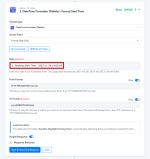
In the Start Time field, you were supposed to pass the date in the format stated in the help text. We added a Date/Time Formatter to your workflow to convert the date to the correct format, and it seems to have fixed the issue.
1763661197215.png


1763661330010.png


Thanks & Regards,
Arshil Ahmad
Customer Support Associate
🌐 Pabbly.com
👉Rate your support
 

Preeti Paryani

Well-known member
Staff member
Hi @Estevez96,

Could you please try deleting and re-adding the Create Event action and check if it works correctly? If the issue still persists, kindly share a screenshot or a short screencast of the complete setup so we can review it further.
 

Estevez96

Member

Attachments

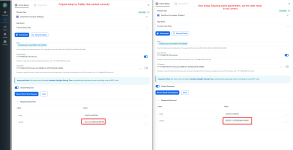
  • Pabbly Side-by-Side.png
    Pabbly Side-by-Side.png
    249.4 KB · Views: 14

Preeti Paryani

Well-known member
Staff member
Hi @Estevez96,

Thank you for sharing the details.

We have escalated this issue to our technical team and will update you as soon as we have more information. The behaviour appears to be specific to the new UI, so as a workaround, you may try creating the same workflow in the Classic Builder.

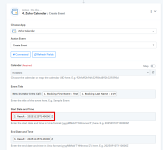
Additionally, the issue you previously reported with Zoho Meeting: Create a Meeting was resolved by correcting the date format. In the current workflow, you are using Zoho Calendar: Create Event, and that action is the one currently under review.

If you configure the Date/Time Formatter exactly as shown in the attached image, the step should not cause any issues in the meantime.

1763789664302.png


Thanks for your patience while we get this resolved.
 

Estevez96

Member
Hello! Thank you SO much for providing the specific time formatting. I was able to create the workflow in the classic builder and this fully meets my needs.

Thank you again! I deeply appreciate your help.
 

Estevez96

Member
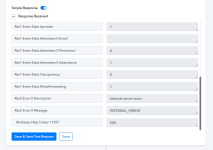
Hello, I am returning to this thread because after running one successful test in the classic builder, I am now getting an 500 Internal Error. The other parts of my booking funnel are all working properly. Additional support would be appreciated here.
 

Attachments

  • 500 interla error 2025-11-23_10-08-05.png
    500 interla error 2025-11-23_10-08-05.png
    30.6 KB · Views: 10

ArshilAhmad

Well-known member
Staff member
Hello, I am returning to this thread because after running one successful test in the classic builder, I am now getting an 500 Internal Error. The other parts of my booking funnel are all working properly. Additional support would be appreciated here.
Could you please share the Workflow URL you have setup in the Classic UI?
 

ArshilAhmad

Well-known member
Staff member
Please allow us some time to look into this concern. We will get back to you with an update soon.
 

Hrishabh.pabbly

Member
Staff member
Hello @Estevez96 ,

Thank you for your patience.

Could you please add the “Attendees Email Addresses” field in the action step Zoho Calendar : Create Event and then test the workflow again?

1763980394909.png


Once done, kindly let us know the results so we can assist you further.
 

Estevez96

Member
Hello @Estevez96 ,

Thank you for your patience.

Could you please add the “Attendees Email Addresses” field in the action step Zoho Calendar : Create Event and then test the workflow again?

View attachment 62493

Once done, kindly let us know the results so we can assist you further.

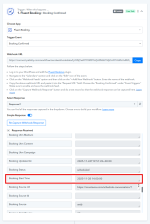
Thank you. The operation seems to be working at the moment, **however** all the calendar events are being created at the same time and date as though the "fix" was hardcoded and does not actually receive the inputs coming in from Fluent Booking and the Time Formatting node (see attached images).
 

Attachments

  • Fluent Booking - CORRECT Input.png
    Fluent Booking - CORRECT Input.png
    78.1 KB · Views: 12
  • Time Formatter - CORRECT INPUT.png
    Time Formatter - CORRECT INPUT.png
    54.3 KB · Views: 13
  • Zoho Cal - INCORRECT output.png
    Zoho Cal - INCORRECT output.png
    43 KB · Views: 14

Preeti Paryani

Well-known member
Staff member
Hello @Estevez96,

Thank you for sharing the images.

Upon checking, we can currently see only one task history after the changes were applied. Based on that, only one calendar event has been created so far. To understand the issue better, could you please clarify which events are getting created with the same date and time?

Please note that the date and time fields are mapped dynamically from the previous steps, so every new entry should capture its own values, convert them through the formatter, and then pass them correctly to the Zoho Calendar action.

Kindly monitor the next few executions and let us know if the issue persists or if we are missing anything in understanding your concern.
 

Estevez96

Member
Hello. I recorded a video to try and recreate the error. I'm unclear on what might be the root cause but hopefully you will be able to determine it. One takeaway from the video is that it does not appear that the workflow itself is firing on its own; only when I click "save and test." Can you let me know if there's an expected delay or refresh rate for workflows to run?

Here is the video link: https://www.dropbox.com/scl/fi/wumq...ey=ve3yeuong0xt0d0sq5cg6uvfx&st=2ri2iaqf&dl=0
 

ArshilAhmad

Well-known member
Staff member
Clicking the 'Save & Send Test Request' button will always create events for the same time.
To properly test whether the time changes with each submission, you need to make an actual submission. Based on your task history, which captures actual new submissions, we can see that the time does change according to the 'Booking Start Date' received from the Fluent Booking trigger step, and the events are created as per the time captured in that trigger step


Soumya Tripathi

Member
Staff member
Hello @Estevez96

The issue you were facing with the action step “Zoho Calendar: Create Event” not saving in the New UI / New Flow Builder has now been fixed.

You can test it on your end, and it should work smoothly.

If you have any other concerns, please let us know — we’ll be happy to assist you.
 
Top