- Your Workflow URL
- https://connect.pabbly.com/v2/app/workflow/mapping/IjU3NjcwNTZmMDYzNDA0M2Q1MjZjNTUzZDUxMzQi_pc
- Your Task History ID
- IjU3NjcwNTZmMDYzNDA0M2Q1MjZjNTUzZDUxMzQi_pc
- Consent to Access & Modify
- I authorize Pabbly Support to log in to my account and make changes to the specified workflow for troubleshooting.
Hi there,
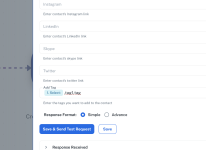
I'm currently creating and updating contacts in Mautic using a webhook, and everything works fine. However, I now need to add more than one tag to a contact. I've tried separating the tags with a comma, but when the contact is created in Mautic, the tags appear as a single tag containing "tag1,tag2" instead of being separated.
How can I achieve this?
Thanks ind advance!
I'm currently creating and updating contacts in Mautic using a webhook, and everything works fine. However, I now need to add more than one tag to a contact. I've tried separating the tags with a comma, but when the contact is created in Mautic, the tags appear as a single tag containing "tag1,tag2" instead of being separated.
How can I achieve this?
Thanks ind advance!