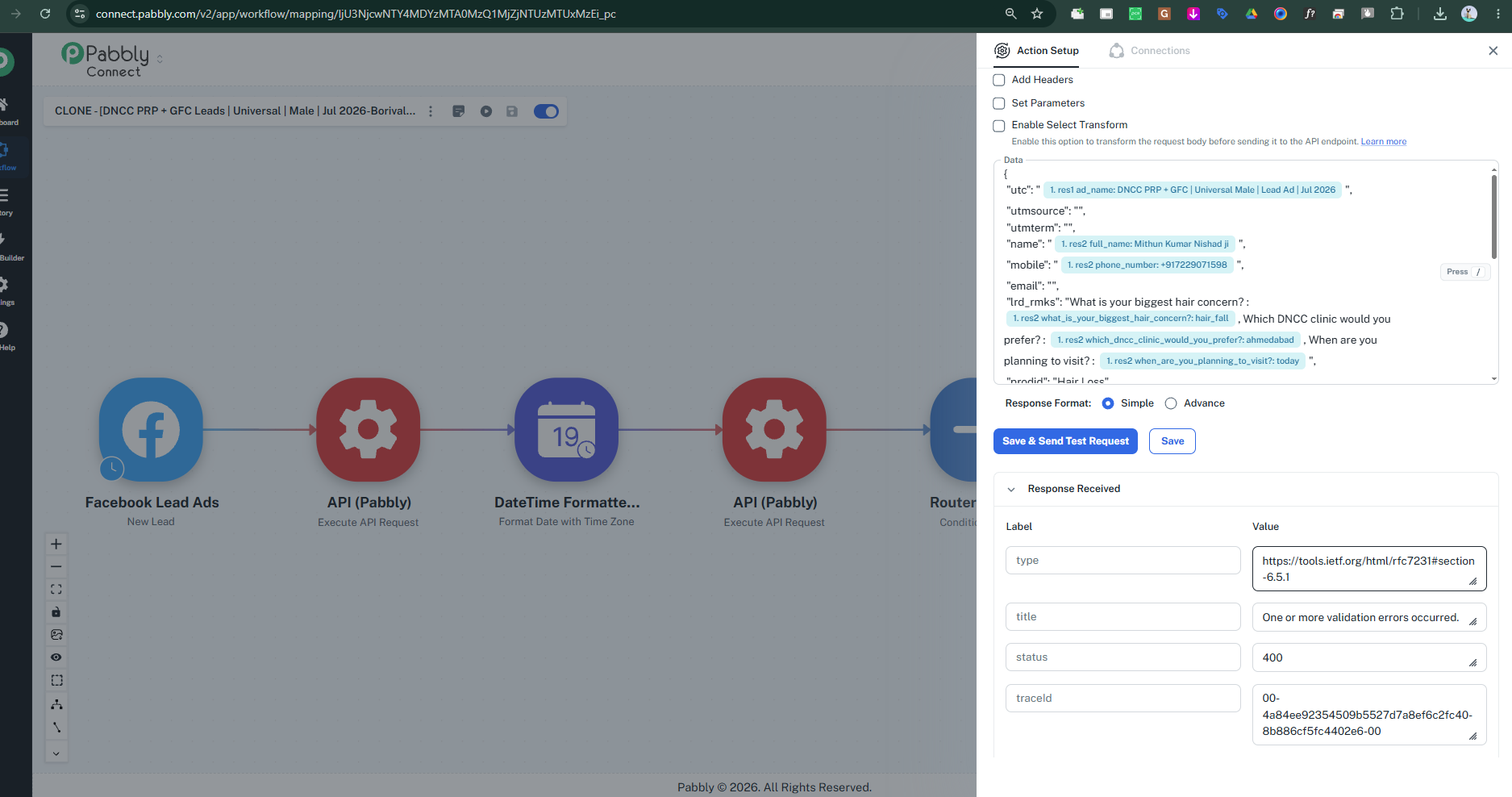
API(Pabbly) not connecting giving error
Status: Open · Asked by support dncc dncc on · 0 views
Hello,
Thank you for reaching out to Pabbly Support.
The error "One or more validation errors occurred: Value cannot be null" happens because cloned workflows copy the structure of the steps but do not automatically transfer the live captured response data from the original workflow. As a result, the parameters mapped inside your API by the Pabbly step are receiving empty/null values, resulting in a 400 Bad Request error.
To resolve this, please follow these steps:
Open the Cloned Workflow and go to the Trigger step (Step 1).
Click on Re-capture Response.
Perform a test action in your trigger app (e.g., submit a test form or create a test record) so that Pabbly Connect receives fresh sample data.
Go to your API by Pabbly step (and any intermediate steps), ensure the required fields/JSON payload are properly mapped with the newly captured data, and click Save & Send Test Request.
Once the test request is successful, make sure the workflow is turned ON.
Please give this a try and let us know if you run into any further issues!
I have done the mentioned step but same error i am getting .. check json data is changed but getting error
