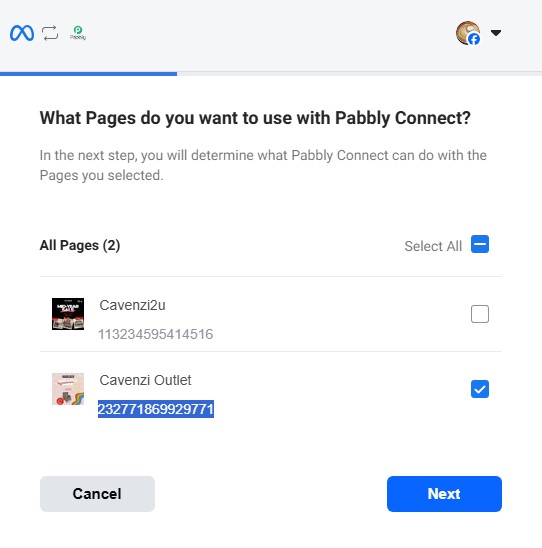
Business page not appearing
Status: Closed · Asked by Cavenzi Malaysia on · 0 views

Hello,
Thanks for reaching out and sharing the error details.
The error you're seeing (GraphMethodException, Code 100, related to appsecret_proof) is typically caused by the Require App Secret security setting being enabled inside your Meta Developer app dashboard, which blocks external server requests. To resolve this:
1. Log in to your Meta Developers Dashboard (https://developers.facebook.com/).
2. Select the Meta App associated with your connection.
3. In the left menu, go to App Settings > Advanced.
4. Scroll down to the Security section.
5. Set Require App Secret to No / Disabled.
6. Save your changes at the bottom.
Regarding your Facebook Page not appearing in the dropdown, this usually happens when not all pages/permissions were granted during the OAuth step. Please try the following:
1. Reconnect your Facebook account in the Pabbly Connect step.
2. When Facebook prompts you to choose which pages Pabbly can access, click Edit Settings / Edit Access and ensure ALL the pages you want to use are checked.
3. Grant every requested permission — if any are toggled off, the corresponding pages won't appear.
4. Save and refresh the dropdown in Pabbly Connect.
Also verify that the connected Facebook account has admin/editor access to the page. A step-by-step walkthrough is available here: https://www.youtube.com/watch?v=HDauRE3BtxI
If the issue persists after these steps, please share a screen recording of the connection process so we can investigate further.
Hello,
Just following up on our previous email to check if you need any further assistance from our end.
Please feel free to let us know if you have any questions or concerns. We’ll be happy to assist you.
Hello!
It seems that the matter has been resolved, as we haven’t received any further queries from your side.
If there are any other concerns, please do let us know. We will be happy to assist you.