

I want to create invoices in Invoice Ninja from new WooCommerce orders. Here is my workflow outline:
1. Trigger: New order in WooCommerce
2. Line itemizer to get the items in the order
3. Create an invoice in Invoice Ninja
The problem is that WooCommerce doesn't include the line item price, it only includes the subtotal. The below order includes the following:
Web Development 2x$50 = $100
Website migration 1x$75 = $75
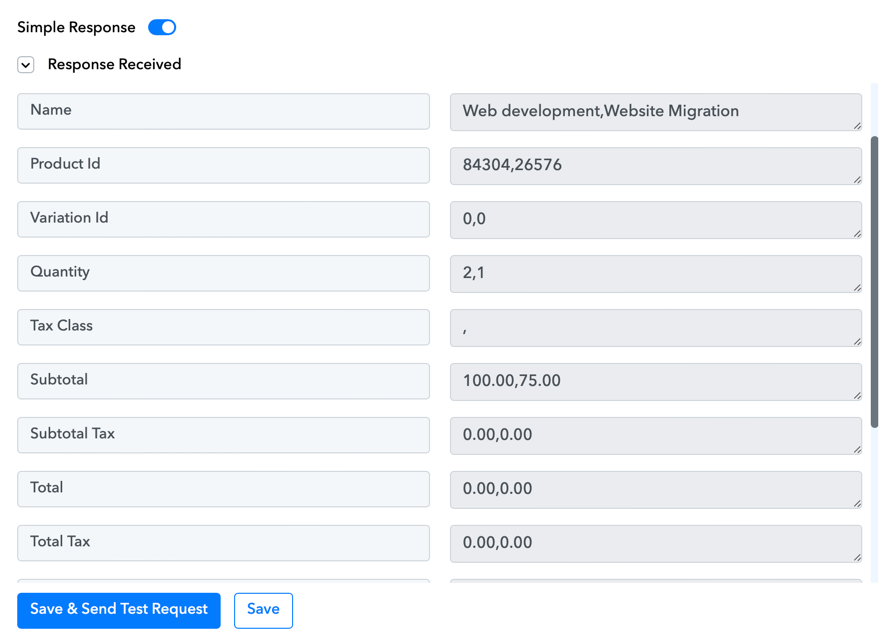
Invoice Ninja needs the rate and quantity of each line item, i.e. rate for Web Development is $50. It's easy to find this value, just take the subtotal and divide by the quantity. But how do I do this with Pabbly please?
I need the output to be
Thank you
1. Trigger: New order in WooCommerce
2. Line itemizer to get the items in the order
3. Create an invoice in Invoice Ninja
The problem is that WooCommerce doesn't include the line item price, it only includes the subtotal. The below order includes the following:
Web Development 2x$50 = $100
Website migration 1x$75 = $75
Invoice Ninja needs the rate and quantity of each line item, i.e. rate for Web Development is $50. It's easy to find this value, just take the subtotal and divide by the quantity. But how do I do this with Pabbly please?
I need the output to be
50,75. Thank you


