
Replied Embedded Signup blocked by "phone number is already linked to automatic events" error — unable to locate Auto Labels setting in WA Business App

nitheesh

Member
Grant Account Access for Support
  1. I authorize the Pabbly Support Team to access my account for troubleshooting purposes.
WhatsApp Number
8886665751
Email Address
[email protected]
Hi Pabbly Support Team,

I am attempting to connect my WhatsApp Business number to Pabbly Chatflow using the Coexistence (Connect a WhatsApp Business app) option via the embedded signup flow, and I'm stuck at the phone number verification step with an error I cannot resolve.

My setup:

  • Phone Number: +91 88866 65751
  • Business Portfolio: Virtualca
  • WhatsApp Business Account in Meta Business Manager: VirtualCA Services
  • Country: India
  • Onboarding flow selected: Connect a WhatsApp Business app (Coexistence path)
  • Session ID: 019e40a7-3aab-7108-b7c8-797e6f63bec3


  • Exact error received (during embedded signup):


    "Your phone number is already linked to automatic events. To use it for embedded sign-up, turn off Auto labels in Business tools > Labels in your WhatsApp Business app." (#3441061:019e40a7-3aab-7108-b7c8-797e6f63bec3)

    What I have already tried:
    1. Searched extensively in my WhatsApp Business App for a "Labels" option under Business tools — there is no Labels menu visible in my current app version.
    2. Looked under Settings → Business tools → no Labels submenu exists.
    3. Looked under Settings → Account → no related option.
    4. Tried disabling Away Message and Greeting Message under Business tools — no change.
    5. Force-closed and reopened the WhatsApp Business App.
    6. Clicked Back and re-attempted the embedded signup — same error reappears.

  • My questions:
    1. Where exactly is the "Auto Labels" setting located in the current version of the WhatsApp Business App for Indian users? It does not appear under Business tools → Labels in my installation.

  • Please advise on the resolution path. Screenshot of the error is attached for reference.


    Looking forward to your guidance.


    Thanks and regards, Nitheesh
 

Attachments
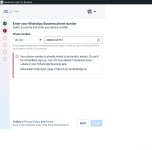
  • Screenshot_2.jpg
    Screenshot_2.jpg
    96.1 KB · Views: 3
Last edited:

ArshilAhmad

Well-known member
Staff member
Hi @nitheesh,

The error is being triggered because your WhatsApp Business App currently has Meta’s “automatic events” / “Auto Labels” feature enabled internally, even though the Labels menu is no longer visible in newer WhatsApp Business app versions for some regions, including India.


The message: “Your phone number is already linked to automatic events”
usually means the number has previously enabled:

  • Auto Labels
  • Automated categorization
  • Business Platform experiments
  • Meta business integrations tied to labels/events
In the latest WhatsApp Business App versions, the Labels settings location has changed or disappeared for many users.

Try these steps in exact order:

  1. Update WhatsApp Business App on your phone.
Ensure you are on the latest version.

  1. Check for Labels from Chat Screen
    Sometimes Labels only appear from:
  • Open WhatsApp Business
  • Tap the 3 dots menu
  • Look for:
    • Labels
    • Business tools
    • Business customization
If Labels appears:

  • Open Labels
  • Disable anything related to:
    • Auto labels
    • Automatic labeling
    • Smart labels
    • Automatic categorization
  1. Disable Connected Business Features
    Go to:
  • Settings → Business tools
Disable temporarily:

  • Catalog
  • Facebook & Instagram integration
  • Ads
  • Greeting message
  • Away message
Then retry embedded signup.

  1. Remove Existing Meta Connection
    This is the step that usually fixes it.
Go to:

  • Meta Business Settings
Then:

  • Accounts → WhatsApp Accounts
  • Check whether the number is already partially connected
  • Remove/disconnect the number if present
Also check:

  • Integrations
  • Business Apps
  • System Users
Remove anything linked to this number temporarily.

  1. Try From Another Device
    Sometimes the coexistence flag is cached locally.
Try:

  • Another Android phone
  • Or WhatsApp Business Web logout/login
  • Then retry onboarding
  1. Most Important Workaround (Usually Works)
    Inside WhatsApp Business App:
Go to:

  • Settings → Business tools
If you do NOT see Labels:

  • Change app language to English (US)
  • Force close app
  • Reopen
Many Indian-region installs hide the Labels section in localized builds.

After switching language:

  • Labels often reappears
  • Then disable Auto Labels
  1. If Labels Still Does Not Exist
    This usually means your number was enrolled into an older business automation experiment and only Meta can clear it.
In that case:

Request:

  • Removal of “automatic events” linkage
  • Reset of embedded signup eligibility for coexistence onboarding
Mention this exact error code:

  • #3441061
and provide:

  • Session ID
  • Business Portfolio name
  • WhatsApp number
Also explicitly mention: “Labels menu is absent in current WhatsApp Business App version for this account.”
One additional important point:

If this number was EVER:

  • connected to another BSP,
  • used in Cloud API,
  • connected through 360dialog,
  • WATI,
  • AiSensy,
  • Interakt,
  • Gallabox,
  • etc.,
then hidden automation bindings may still exist on Meta’s side, causing this exact error during coexistence onboarding.

Thanks & Regards,
Arshil Ahmad
Customer Support Associate
🌐 Pabbly.com
 
Top