Formatting Phone Numbers

Status
Not open for further replies.

em-admin

Member
currently, our subscribers type in their US phone numbers in any format such as:

111 111 1111
111-111-1111
(111) 111 1111
1 111 111 1111
+1 111 111 1111

etc... is there a way to set it in Pabbly flow so that it converts all variations to a +1 111 111 1111 format, no matter in which way they enter?

thanks
 

Himesh

Active member
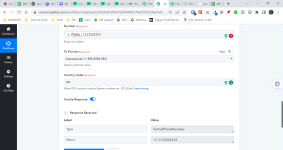
Hello @em-admin , try this
Screenshot_2023-11-18-15-57-04-033_com.android.chrome-edit.jpg
 

em-admin

Member
thanks! in your screenshot I can see that Number Required is set to (111) 111 1111, does it mean that only when this format is entered, only then the formatting by Pabbly take place? what if a user enters 111-111-1111... will your suggested setup still work? and if wouldn't work, what is a solution to address all possible formats, as per my original question?
 

em-admin

Member
thanks, I tried and it does not return as per example, with spaces or dashes in between. how can we achieve a number to be returned in a format +1 111 111 1111 or +1 111-111-1111 ?
 

Attachments

  • 2023-11-19_13h12_38.png
    2023-11-19_13h12_38.png
    133.8 KB · Views: 140

ArshilAhmad

Well-known member
Staff member
Please try using the following Python code, which should help you achieve your desired output.

Python:
def format_phone_number(phone_number):
    # Remove any non-numeric characters from the phone number
    clean_number = ''.join(filter(str.isdigit, phone_number))

    # Check if the number is valid and has at least 10 digits
    if len(clean_number) >= 10:
        # If the number already has the US country code, use it; otherwise, add it
        if len(clean_number) >= 11 and clean_number[:2] == '1':
            formatted_number = f"+{clean_number[:2]} {clean_number[2:5]} {clean_number[5:8]} {clean_number[8:]}"
        else:
            formatted_number = f"+1 {clean_number[-10:-7]} {clean_number[-7:-4]} {clean_number[-4:]}"
        return formatted_number
    else:
        return "Invalid phone number"

# Example usage:
phone_number_input = "+1 987 654 3210"
formatted_number = format_phone_number(phone_number_input)
print(f"Formatted number: {formatted_number}")

1700414868563.png
 
Status
Not open for further replies.
Top