• Instructions to Ask a Question

    For any assistance, please click the "Ask a Question" button and select the Pabbly product for which you require support.

    We offer seven comprehensive applications designed to help you efficiently manage and grow your business:

    Our support team endeavors to respond within 24 business hours (Monday to Friday, 10:00 AM to 6:00 PM IST). We appreciate your understanding and patience.

    🖤 BLACK FRIDAY DEALS ARE NOW LIVE! 🖤

    🔥 Enjoy an exclusive 10% discount on our LTD Plan — first-time ever offer!

    🚀 Unlock the Pabbly Plus Unlimited Yearly Plan and get unlimited access to every Pabbly application at a truly unbeatable Black Friday price.

    👉 Grab the Black Friday Offer

FreeAgent - Create Project

Status
Not open for further replies.

jods1972

Member
Your Workflow URL
https://connect.pabbly.com/workflow/mapping/IjU3NjYwNTY0MDYzMDA0MzE1MjZiNTUzYzUxMzMi_pc
Consent to Access & Modify
I authorize Pabbly Support to log in to my account and make changes to the specified workflow for troubleshooting.
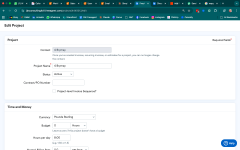
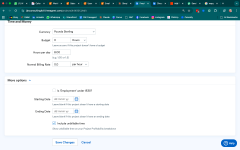
I am setting up a connection from my CRM to FreeAgent via Pabbly Connect and the Create Project step asks for a billing period, only billing period doesn't exist in FreeAgent and so it is impossible to complete the step. It is a required field, so it can't be left blank. I have attached screenshots of a project setup in FreeAgent.
 

Attachments

  • Screenshot 2025-11-10 at 21.04.46.png
    Screenshot 2025-11-10 at 21.04.46.png
    151.8 KB · Views: 15
  • Screenshot 2025-11-10 at 21.04.40.png
    Screenshot 2025-11-10 at 21.04.40.png
    145.4 KB · Views: 19

Preeti Paryani

Well-known member
Staff member
Hello @jods1972,

Yes, those fields are required. You can fill in the Billing Period and Hours per Day fields as explained in the help text.

Essentially, it depends on the specific project — how many days you’ll be working and how many hours you’ll invest each day. For example, if the project will take 7 days and you’ll work 2 hours per day, then set Billing Period = 7 and Hours per Day = 2.

Please fill in the fields accordingly and let us know how it goes.
 

jods1972

Member
Hi. I have it set at 7 hours per day and tried all kinds of numbers in the billing period box, 1, 0, 30, 7 and all comes up as an error. Billing period is not a field in FreeAgent so this information will not be transferred. This isn't my user error, this is a setup error, so I think it needs amending by Pabbly Connect.
 

Preeti Paryani

Well-known member
Staff member
Hello @jods1972,

You do not need to enter any number in the Billing period. You can either add a text, day, or hour. Try testing with it and let us know how it goes.

1762847355108.png
 

Preeti Paryani

Well-known member
Staff member
Hello @jods1972,

Glad it worked.

As your issue has been resolved, we’d appreciate it if you could share quick feedback on the support received:
https://forms.gle/GAjS4wdPYKuhnEYV9

Thank you for your time.

PS: We are closing this thread as the issue is resolved. Please feel free to reach out to us if you face any issues in the future.
 
Status
Not open for further replies.
Top