Hubspot create a meeting engagement

bajglass

Member
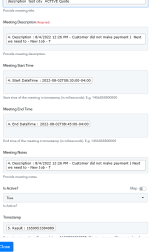
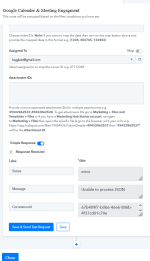
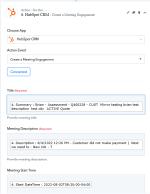
I have screenshots below.
I have had previous assistance with creating a Note engagement with hubspot.
Now I am having trouble creating a meeting engagement.

Workflow -

New Intake - INTAKE - Create ticket

2nd router - google calender and create meeting.

simply says, unable to process JSON.

Kindly, please inform me if there is something in my attachments that should be removed or blacked out.
 

Attachments

  • Screenshot 2022-08-08 at 07-21-43 Pabbly Connect.png
    Screenshot 2022-08-08 at 07-21-43 Pabbly Connect.png
    32.9 KB · Views: 175
  • Screenshot 2022-08-08 at 07-21-23 Pabbly Connect.png
    Screenshot 2022-08-08 at 07-21-23 Pabbly Connect.png
    36.6 KB · Views: 169
  • Screenshot 2022-08-08 at 07-20-39 Pabbly Connect.png
    Screenshot 2022-08-08 at 07-20-39 Pabbly Connect.png
    55.6 KB · Views: 172
P

Pabblymember11

Guest
Hey @bajglass

In the action step, you need to pass the date time in the TimeStamp format instead of Compete date format.

You can use the "Date Time Formatter" action step to convert the time into Timestamp format.

1659962420245.png
 

bajglass

Member
Ok I have it but I keep getting for my
timestamp
the start time of the meeting, instead of the timestamp of entry date from the start of my form.
Do you know why this is happening?
 
P

Pabblymember11

Guest
Hey @bajglass

Do you know why this is happening?

As per the API documentation of Hubspot, you have to pass the start and stop time in Timestamp which we have already mentioned.

Further, to convert the date time into timestamp format you can use the Date Time Formatter action step.
 
Top