Hey
@penatemiguel
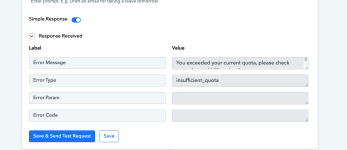
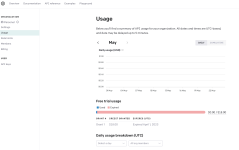
When you receive an "insufficient_quota" error message while utilizing the Chat GPT API, it signifies that you have surpassed the assigned API usage limit or quota. This error indicates that you do not possess an adequate amount of available resources to carry out the requested API call successfully. To resolve this issue, there are a few steps you can take. First, it is advisable to review your API usage and ensure that you have not exceeded the allocated quota. This can be done by checking your account settings or reaching out to the API service provider for clarification.
If you consistently encounter the "insufficient_quota" error due to high usage, upgrading your API plan might be a viable option. This upgrade would increase your resource allocation, allowing for a higher usage limit or a greater number of API calls.
Another option is to wait until the quota resets, which typically occurs on a daily or monthly basis according to the API provider's policy. If you have exceeded your quota for the current period, you may need to be patient and wait for the reset before making additional API calls.
Additionally, it is beneficial to optimize your API usage by reviewing your implementation and ensuring that you are utilizing the API efficiently. Avoid making unnecessary or duplicate API calls and consider implementing response caching when applicable. If you are accessing the Chat GPT API through a third-party service or platform, it is recommended to consult their documentation or support channels for specific troubleshooting steps related to the "insufficient_quota" error.

help.openai.com