

• Instructions to Ask a Question

    For any assistance, please click the "Ask a Question" button and select the Pabbly product for which you require support.

    We offer seven comprehensive applications designed to help you efficiently manage and grow your business:

    Our support team endeavors to respond within 24 business hours (Monday to Friday, 10:00 AM to 6:00 PM IST). We appreciate your understanding and patience.

  • Due to Holi celebrations, our team will have limited availability. While we’ll continue to monitor threads, responses may be slightly delayed. Normal operations will resume on Thursday, 5th March 2026.

label error

Status
Not open for further replies.

anto

Member
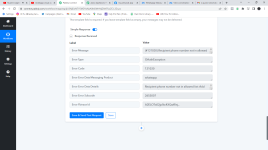
"error > message": "(#131030) Recipient phone number not in allowed list",
"error > type": "OAuthException",
"error > code": 131030,
"error > error_data > messaging_product": "whatsapp",
"error > error_data > details": "Recipient phone number not in allowed list: Add recipient phone number to recipient list and try again.",
"error > error_subcode": 2655007,
"error > fbtrace_id": "APivskjpLoVZENCfU5ZSUUh"
}
 

Attachments

  • Pabbly Connect - Google Chrome 13-09-2022 10_29_53.png
    Pabbly Connect - Google Chrome 13-09-2022 10_29_53.png
    75.4 KB · Views: 135
P

Pabblymember11

Guest
Hey @anto

Seems like you haven't authenticated your Cloud API account correctly whereas you need to verify your main WhatsApp number from their end.

You can refer to the following video tutorial for the same.

 
My message template is pending Active – Quality pending . I am getting same error message Recipient phone number not in allowed list: Add recipient phone number to recipient list and try again.

Please help
 
P

Pabblymember11

Guest
Hey @Pradeep Gopi

Seems like you haven't verified your phone number in your Cloud API in-correctly and because of that, you are getting the error message.-

Please refer to the following video tutorial on how you can configure your WhatsApp Cloud API.

(Watch the first part of the video)
 
P

Pabblymember11

Guest
Hey @Pradeep Gopi

As we can see from your workflow your WhatsApp cloud API action is sending the messages to the respective recipients accordingly.

Let us know if the issue still persists.

1665489982976.png
 
Status
Not open for further replies.
Top