Microsoft Office 365 Module erroring out on Calendar Deletes
Status: Answered · Asked by Alan Poon on · 0 views
Hi,
Thank you for sharing the workflow screenshot and the complete error response.
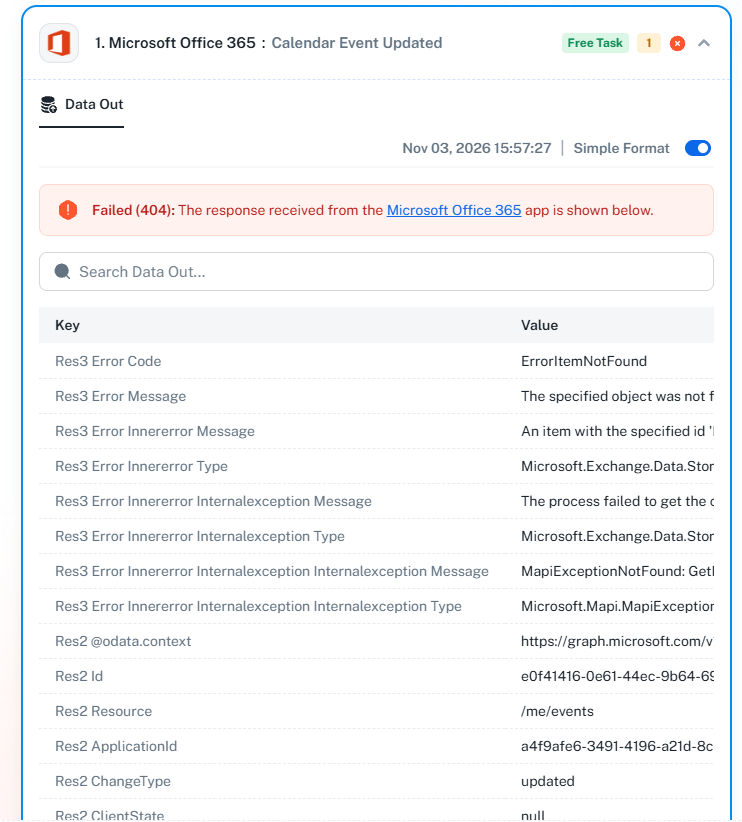
We reviewed the execution details and found that the Calendar Event Updated trigger receives the Microsoft Office 365 notification, but the subsequent event lookup fails with a 404 – ErrorItemNotFound error when the event has been deleted. This happens because Microsoft can no longer retrieve the event after its deletion.
To handle this scenario, we recommend keeping your existing workflow for regular calendar updates and creating a separate workflow for deleted events.
Please follow these steps:
Create a new workflow in Pabbly Connect.
Select Microsoft Office 365 as the trigger application.
Choose Calendar Event Deleted as the trigger event. If you want to monitor only a particular calendar, you can use Specific Calendar Event Deleted.
Connect the same Microsoft Office 365 account and test the trigger by deleting a test event.
Configure the required subsequent actions to process the deleted event, such as updating or removing its corresponding record in Google Sheets.
This approach separates regular event updates from deletion events, preventing the existing update workflow from relying on event details that are no longer available.
Please test the deletion trigger first to confirm that it returns the event information required for your subsequent actions.

Thanks Naman. I will try that. In the meantime, can you confirm the existing Calendar Event Update trigger has been updated to exclude event deletes? Otherwise, errors will keep occurring and similar automated error-out emails from Pabbly will keep getting sent to me.

Hi Alan,
Thank you for sharing the latest screenshot.
We reviewed the latest Task History (ID: IjU3NjYwNTZmMDYzZTA0MzY1MjZjNTUzYzUxMzE1MTY1NTQzOTBmMzQi_pc) and found that the issue is still occurring.
The execution confirms that Microsoft is sending the notification successfully, but the subsequent event retrieval is still returning the same 404 – ErrorItemNotFound error.
We also noticed that the subscription is still configured with the updated change type. Therefore, the latest execution does not indicate that the dedicated deletion trigger has been configured or tested.
As suggested earlier, please use the Calendar Event Deleted trigger in a separate workflow to handle deleted events, while retaining your existing Calendar Event Updated workflow for regular event modifications.
Hi Naman,
I understand "the Calendar Event Deleted trigger" needs to be used in a separate workflow to handle deleted events. That's no problem and I'll do that.
What I'm asking is...
Because the workflow in question must use the Calendar Event Update function (ie. it is used to capture changes to the event). Before (ie. before you guys introduced the Calendar Delete function yesterday), whenever events were deleted, the module was capturing it as a "update" and sending off errors.
My question today is, with the creation of the Calendar Event Deleted trigger, was the Calendar Event Update trigger patched out so it no longer captures deletes. That needs to be fixed otherwise I'm still getting errors. Hopefully that makes sense?
Hi Alan,
We reviewed the Task History and found that Microsoft is sending a notification with ChangeType: updated. However, when Pabbly attempts to retrieve the corresponding event details, Microsoft returns the following error:
Error Code:
ErrorItemNotFoundError Message:
The specified object was not found in the store.Error Type:
Microsoft.Exchange.Data.StoreObjects.ObjectNotFoundException
This indicates that the event is no longer available when Pabbly attempts to retrieve its details. The notification itself is still marked as updated, rather than deleted.
We understand that your concern is whether the existing Calendar Event Updated trigger has been modified to exclude deletion-related notifications. The screenshot confirms that the current execution is still encountering this issue, but we need to review the trigger's behavior further to confirm whether the required change has been implemented.
To discuss this and review the expected behavior together, please book a convenient meeting slot using the link below:
I suppose one way to find out is to keep using the workflows now that the triggers and modules have been updated. Need this info before we can have fruitable discussion... Let me do that and circle back.
Will keep you guys posted.
I'll make workflows using the newly created Calendar Event Deleted trigger as well so we have benchmarking info also. Thanks for making it team.
Hi Alan,
Sounds great! Thank you for testing this out on your end.
Please go ahead with creating the workflows using the new Calendar Event Deleted trigger and running your tests. Whenever you have the benchmarking results ready, feel free to update us here.
We will keep this ticket open and await your update.
Hello,
Just following up on our previous email to check if you need any further assistance from our end.
Please feel free to let us know if you have any questions or concerns. We’ll be happy to assist you.
Hi there,
The Calendar Event Deleted Trigger doesn't work as designed. As well, the existing Calendar Event Updated Trigger still picks up the deleting event action and report error. Please blockt those so they no longer trigger anymore.
New workflow IjU3NjYwNTZmMDYzZTA0MzA1MjZhNTUzMzUxMzc1MTYzNTQzNDBmMzci_pc was made to test the new Calendar Event Deleted Trigger. Similar error as before. Seems like the trigger is unable to grab the event information:

Hi Alan,
Thank you for sharing the latest Task History details.
We reviewed the execution of your Calendar Event Deleted trigger and confirmed that Microsoft is sending the deletion notification successfully.
The response contains:
Change Type:
deletedResource: The ID of the deleted calendar event
Notification Status: Received by Pabbly
However, the trigger subsequently attempts to retrieve the deleted event from Microsoft. Microsoft returns the following error:
ErrorItemNotFound – The specified object was not found in the store.
This indicates that the notification is received, but the event lookup fails because the event is no longer available.
We need the whole process video clip that you're doing which can help share to our further team and have the checks done and resolve at the earliest.
Hi Naman,
There's nothing to video clip, really. It literally is just the workflow on one side, and me deleting the calendar event within Outlook calendar. The error comes up immediately when listener picks up the delete signal from my outlook account.
Can you guys test on it on your end for troubleshooting? I'm just the end user pointing out an error on the step results. If you need to look my workflow, please do so. Thanks
Hi Alan,
Thank you for your patience.
As explained earlier, we have shared the identified behavior with our integration engineering team for further review and necessary improvements to the Microsoft Office 365 trigger module.
We had also attempted earlier to arrange a Google Meet session with you to investigate the issue in real time and better understand the exact behavior, even if the investigation required additional time.
In the meantime, we request you to proceed with the recommended approach outlined in our previous response. If you encounter the same issue again, please share the relevant execution details with us so we can review the behavior and determine whether further technical escalation is required.
We appreciate your cooperation and look forward to your update.
Thanks & Regards,
Shekh Dilshekh
Customer Support Specialist
Sorry to hear that. There's nothing more I can provide other than what I've already provided.
Have to say I'm a bit dis-satisified with this result and response. I'm fine with leaving like that and will find other ways to get around the faulty trigger.
From what I'm seeing, "trigger subsequently attempts to retrieve the deleted event from Microsoft" and fails to retrieve the data causing the error. My guess is probably because event was deleted. As such, the source of the problem is not fixable. I'm unwilling to spend more time on such a wild goosechase. Close this ticket.
Hi Alan,
Thank you for your patience and for sharing your feedback.
We completely understand your frustration and disappointment regarding the continuous follow-ups and the issue taking time to get resolved. Please be rest assured that based on our findings so far, we have escalated this directly to our integration engineering team for a deeper technical review and investigation. We will surely reach out to you as soon as we receive an update from them.
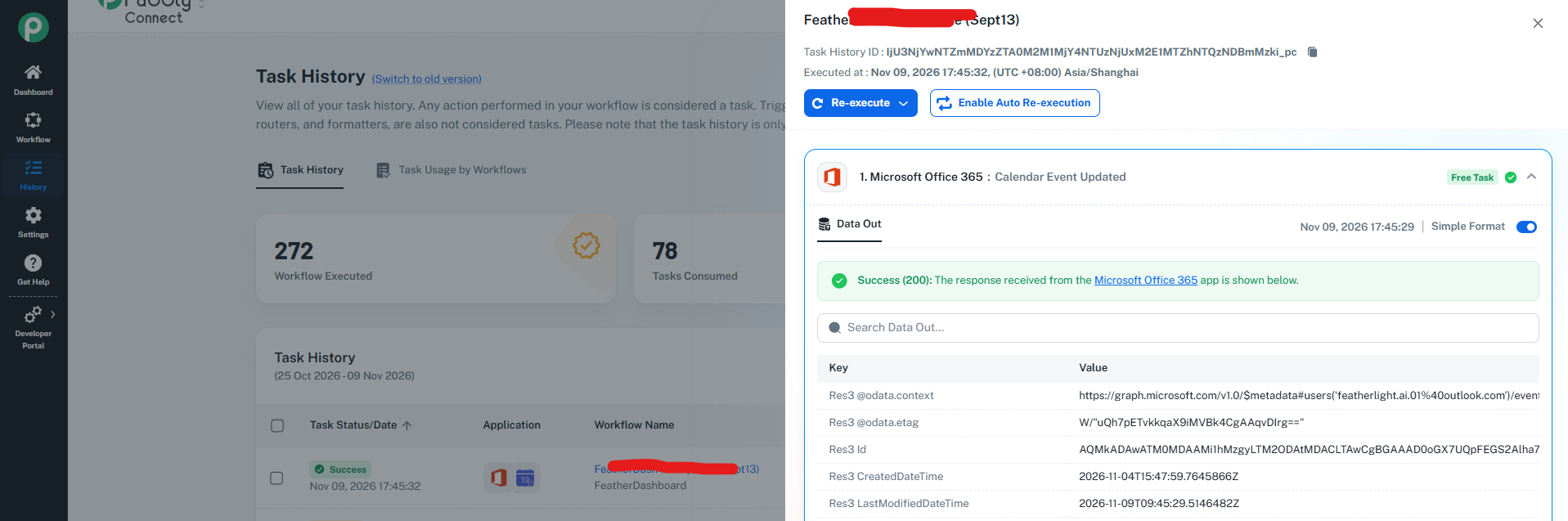
In the meantime, we noticed in your recent workflow execution that the trigger event was set to "Calendar Event Updated" and it executed successfully without throwing any errors. Could you please confirm if you have made any recent changes on your end or if the workflow is currently working as expected for you?
Once you confirm, we can proceed further and assist you accordingly and effectively.
Thanks & Regards,
Shekh Dilshekh
Customer Support Specialist
That particular one was a event update, specifically, a date move. This type of trigger always goes through with no issue. It's the event delete that causes the issue all the time.
Hi Alan,
Thank you for clarifying.
We understand that standard event updates (like date changes) process successfully without errors, and that the issue specifically occurs when an event is deleted.
We have forwarded these details along with your ticket context directly to our team so they can investigate how the trigger handles event deletion notifications and work on preventing these retrieval errors.
We will update you here as soon as we receive news or a fix from the team.
Hi Alan,
We have an update from our engineering team.
The issue with the Microsoft Office 365 – Calendar Event Deleted trigger has been fixed.
Please test the Calendar Event Deleted trigger by deleting a test event in your Outlook calendar and verify whether it now executes successfully without returning the previous 404 – ErrorItemNotFound error.
Regarding the Calendar Event Updated trigger, regular event updates should continue working as before. We would also appreciate it if you could verify whether deleting an event still causes an unwanted execution or error in this trigger.
Please share the test results with us so we can confirm that both trigger behaviors are working as expected.
Thank you.
I tried it just now (ie. deleted a calendar event) and the following transpired:
Microsoft Office 365 – Calendar Event Deleted
The calendar event deletion did not trigger the workflow. Please check. Do I need to delete the workflow and select it again or should it be automatic?
Calendar Event Updated
Confirming that regular event changes still get processed but deleting the event still triggers an error. The one just now can be viewed under below task history ID:
IjU3NjYwNTZmMDYzZjA0MzQ1MjZmNTUzZDUxMzc1MTY2NTQzNjBmMzQi_pc
Hi Alan,
Thank you for testing both triggers and sharing the latest results.
We have noted your observations:
Calendar Event Deleted: The workflow is not triggering when a calendar event is deleted.
Calendar Event Updated: Regular event updates are working, but deleting an event still results in an error.
We have shared these latest findings and the Task History ID with our technical team for further investigation.
For now, there is no need to delete or recreate your existing workflows. We will confirm whether any changes or reconnection are required once we hear back from our technical team.
We appreciate your patience and will keep you updated on the progress.
Hi Alan,
Thank you for your patience while our technical team investigated the issue with your Microsoft Office 365 Calendar workflows.
We have resolved the backend trigger behavior where deleting a calendar event caused FeatherDash Cal Update (Sept13) to fail and FeatherDash Cal Delete (Nov4) to return a 404 ErrorItemNotFound error. To complete the setup and verify everything on your end, please perform the following steps in your Pabbly Connect account:
1. Disable Auto Re-Execution on FeatherDash Cal Update (Sept13)
Open the FeatherDash Cal Update (Sept13) workflow.
Click the three-dot menu (
⋮) next to the workflow name at the top left and open Auto Re-Execution Settings.Set Select Auto Re-Execution Attempts to 0 (disable auto re-execution) and click Save.(This ensures that when an event is deleted, the update workflow marks the run as "Stopped" rather than retrying and marking it as "Failed.")
2. Refresh the Trigger Connection on FeatherDash Cal Delete (Nov4)
Open the FeatherDash Cal Delete (Nov4) workflow and click on the Microsoft Office 365: Calendar Event Deleted trigger step.
Click Save & Send Test Request to refresh the Microsoft webhook subscription.
Note: If you still see an older
ResourceNotFoundresponse from a previously deleted event, click Re-Capture 'Webhook' Response and delete a newly created test event in your calendar so it captures a fresh deletion payload.
3. Test Both Workflows
Create a Test Event in your connected Microsoft Office 365 / Outlook Calendar.
Edit the Test Event (e.g., update the title or time) and save it:
Expected Result:
FeatherDash Cal Update (Sept13)will trigger and execute normally.
Delete the Test Event from your Outlook Calendar:
Expected Result:
FeatherDash Cal Delete (Nov4)will trigger cleanly without any404error, andFeatherDash Cal Update (Sept13)will show a Stopped status in Task History without sending failure alert emails.
Important Reminder: Per Microsoft's webhook policy, this trigger subscription remains active for two days at a time and requires at least one calendar event activity within every two-day period to stay active. If no calendar activity occurs for more than two days, you will need to re-save the trigger step to reactivate it.
Please give these steps a try and let us know if you need any further assistance!