Missing Fields on Google Sheet
Status: Closed · Asked by JulieH on · 0 views
Hi - Can I please get some help. I have connected a Google Sheet. When I trigger on that sheet, I see ALL the fields. Later in the same flow, I connect to the same sheet to update the row and some of the fields are missing. Can you please help me get them to show up?
The trigger record below shows the fields I am looking for to update. They are all identical and only one is appearing in the UPDATE ROW action. I have tried deleting and re-adding this action - no change/exact same issue. I'm stuck until this is resolved. Help please?
https://connect.pabbly.com/workflow/mapping/IjU3NjYwNTY5MDYzZTA0MzQ1MjZmNTUzMDUxM2Ei_pc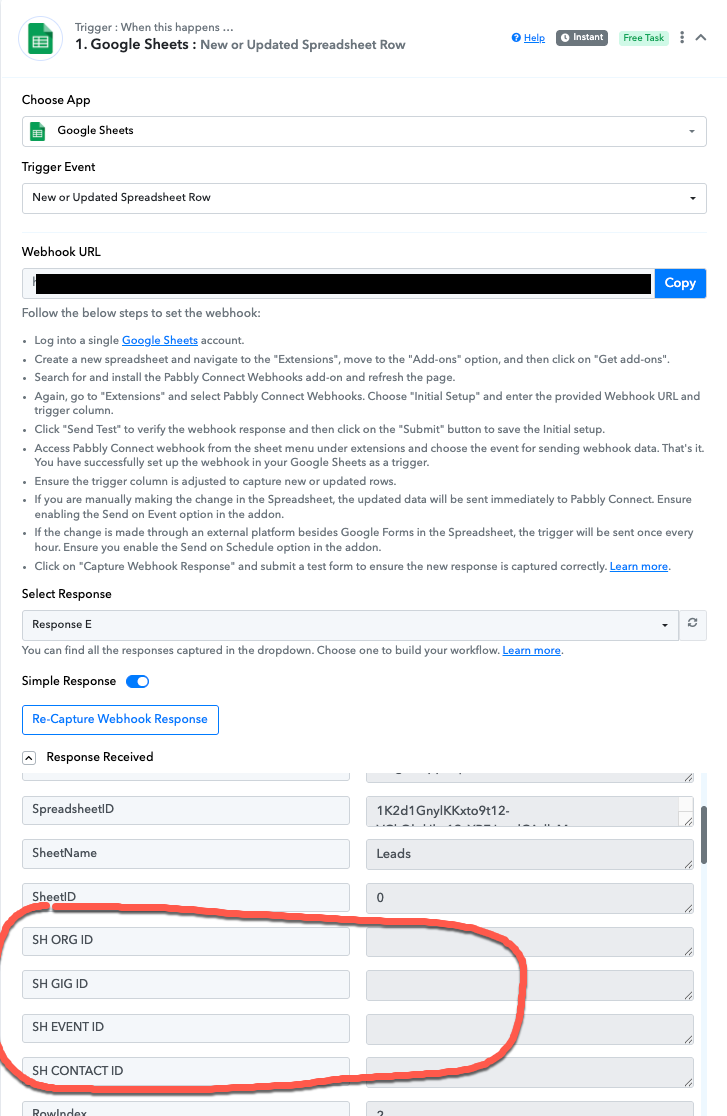
HI @JulieH can you please check if you are able to see those rows in "add new rows" actions And check the connections again if requires check it in incognito mode.
If you are still not able to solve this on your own feel free to DM me and we can do a free zoom call. FYI I'm not from Pabbly Connect team, just a freelancer who helps other Pabbly users.
Contact me - https://www.facebook.com/himeshsoni07
Email - [EMAIL][email hidden][/EMAIL]
HI @JulieH can you please check if you are able to see those rows in "add new rows" actions? And check the connections again if requires check it in incognito mode.If you are still not able to solve this on your own feel free to DM me and we can do a free zoom call. FYI I'm not from Pabbly Connect team, just a freelancer who helps other Pabbly users.
I appreciate your reply, Himesh. They are not in "add new rows" either - on regular or incognito modes. :(
I appreciate your reply, Himesh. They are not in "add new rows" either - on regular or incognito modes. :(
Can you dm me if possible we'll do free zoom call where I'll help you out to resolve your issue.
Contact me - https://www.facebook.com/himeshsoni07
Email - [EMAIL][email hidden][/EMAIL]
I think I've got this resolved - I changed the order of the fields. It seems there is a field limit of some kind.