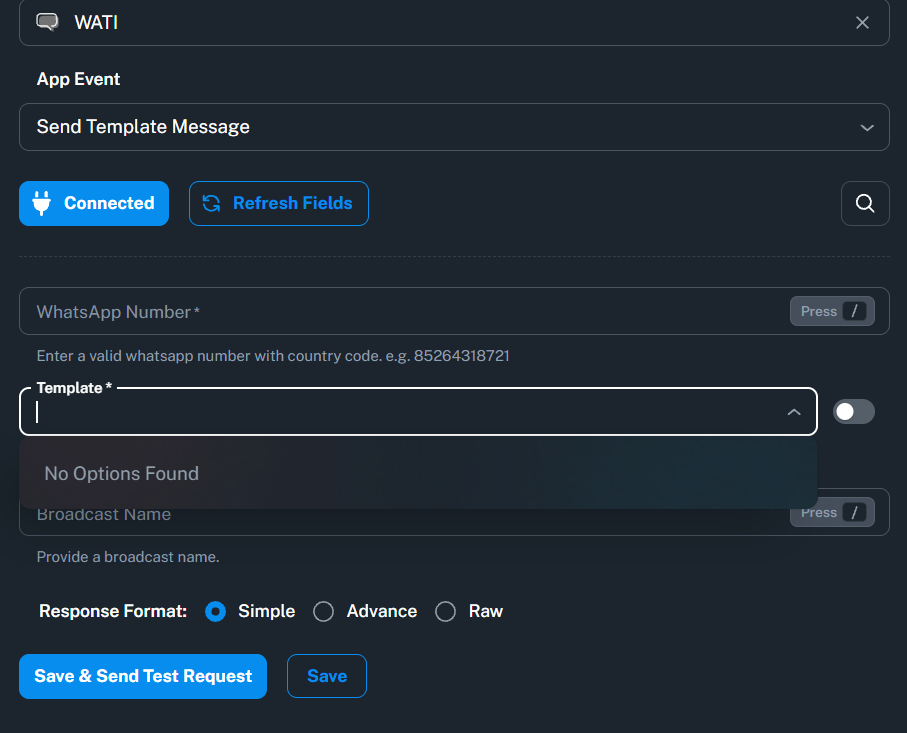
My Wati Templates Are not loading in Pabbly
Status: Closed · Asked by Rashmi Shrivastava on · 0 views
 mplates
Hello Rashmi,
Thank you for reaching out. I understand your WhatsApp templates are not loading in Pabbly.
Templates usually fail to appear when there is an issue with the Meta/WhatsApp connection or a stale connection. Please check the following:
1. Confirm you are connected with the same Meta account in which the templates exist, and that the templates were created under the same WhatsApp Business Account you connected in Pabbly.
2. Ensure all required permissions were granted while authorizing the connection.
3. If you are fetching these in a Pabbly Connect workflow, the workflow may be using an older connection. Open the action step, switch to (or create) the most recent connection tied to your current WhatsApp number, re-save the step, and refresh the template list.
4. Click the refresh icon next to the Template dropdown to re-pull the latest approved templates.
5. Make sure the templates are in Approved status on the correct number.
If you have verified all of the above and the templates still do not appear, please try reconnecting your Meta account by creating a new connection and test again.

Hello,
Just following up on our previous email to check if you need any further assistance from our end.
Please feel free to let us know if you have any questions or concerns. We’ll be happy to assist you.
Thanks & Regards,
Shekh Dilshekh
Customer Support Specialist
🎉Black Friday Early Access
Hello Rashmi,
We hope the troubleshooting steps shared earlier helped resolve the issue with WhatsApp templates not loading in Pabbly.
As we haven't received any further updates, we'll proceed with closing this ticket for now. If the issue persists or you need any further assistance, please feel free to reach out to us.
We would also greatly appreciate it if you could share your feedback on your support experience using the following link: https://www.trustpilot.com/review/www.pabbly.com. Thank you for choosing Pabbly!
Thanks & Regards,
Shekh Dilshekh
Customer Support Specialist