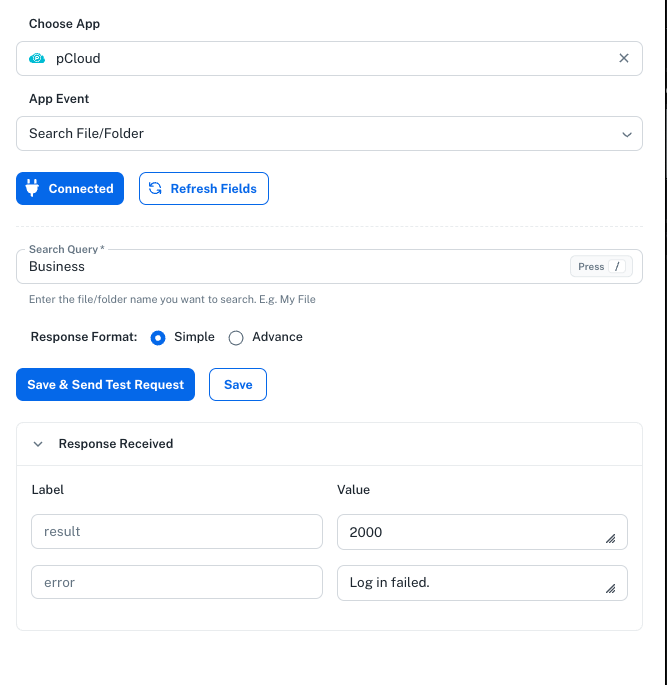
pCloud Login Failed error 2000 (urgent - need it for accounting and calls)

Status: Closed Β· Asked by Anders Nielsen on Β· 0 views

Anders Nielsen β€” Question Β·
image.png

Hi,

No matter what I try I get login failed for any type of App Event. i have even tried to change my pcloud email and password but nothing works. It previously worked perfectly in my flows so something must have changed on your end.

Check this flow where I am trying to add it in the end of a router but also fails in other flows.

Flow: https://connect.pabbly.com/v2/app/workflow/mapping/IjU3NjYwNTY5MDYzMTA0MzM1MjY5NTUzNDUxMzQi_pc
Pabbly Support β€” Reply Β·

Hello Anders,

Thanks for contacting us.

The error that you received while establishing the connection with pCloud application is Error 1022 / Error 2000 which is an issue with the pCloud integration on Pabbly Connect.

What Happened

pCloud recently disabled username/password API authentication, moving strictly to an access token-based OAuth 2.0 system. This change broke existing connections and prevents new ones from being made.

Current Status

Our team reached out to pCloud to migrate the integration to their new system. However, they have informed us that they are currently unable to provide the necessary developer credentials to restore our direct connection.

Because this limitation is entirely on pCloud's side, we cannot fix or restore the integration for the foreseeable future.

Recommended Next Steps

We strongly advise switching to alternative cloud storage platforms that fully support automated workflows. Pabbly Connect maintains stable, active integrations with:

  • Google Drive

  • Dropbox

  • OneDrive

We sincerely apologize for the inconvenience caused by this external change.

Thanks & Regards,

Adeel Akhtar
🌐 Pabbly.com

Anders Nielsen β€” Reply Β·

I have applied for an Oauth token with pCloud. Can't you just migrate to Β΄ that instead of me having to manually use the API?

Also I try to send my Krisp recordings to Google Drive - there I get "sourceUrl is not accessible (HTTP 403). Ensure the file is public" and if I try to use your suggested workaround with Pabbly File uploader I get: "File type not allowed: binary/octet-stream" - I do not have proper space on Dropbox.

Can you check this flow please and help?
https://connect.pabbly.com/v2/app/workflow/mapping/IjU3NjYwNTY5MDYzMTA0MzM1MjY5NTUzNDUxMzQi_pc

And can you comment on the Oauth migration of your pCloud action.

image.png


sourceUrl is not accessible (HTTP 403). Ensure the file is public.

image.pngimage.png

Anders Nielsen β€” Reply Β·

And how do I delete the file from Pabbly Uploader for privacy reasons afterwards also? The idea is to use it for temp storage if it can be made working.

Anders Nielsen β€” Reply Β·

And yeah Dropbox works ok, but I don't have space there. Have 2 TB on pCloud so I really want it there.

Pabbly Support β€” Reply Β·

Hello,

It appears that the link you are attempting to upload to File Uploader (Pabbly) has expired, which could be causing the error. Please try using a different URL and see if that resolves the issue.
image.png

Files uploaded to File Uploader (Pabbly) remain available for 15 minutes, after which they are automatically removed from our servers, so you don't have to delete them manually. It simply acts as temporary storage.

As for the concern related to pCloud, as mentioned previously, our team has already contacted pCloud multiple times regarding the migration, but they haven't provided the necessary developer credentials to restore our direct connection. We suggest contacting them from your end as well.

Thanks & Regards,
Arshil Ahmad
🌐 Pabbly.com
Anders Nielsen β€” Reply Β·

Hi Arshil,
You answered 16 hours after so unfortunately, the link is expired now but that was not the previous problem. I tested when it was available and it gave the error I showed. Unless you check quickly within 10-15 minutes after I post a new link you are not able to check because Krisp links auto expire after some minutes.

Pabbly Support β€” Reply Β·

Hello Anders,

Can you upload the file to Krisp and execute the action step so that the file can be called, and then we can check the Dropbox actions.

Thanks & Regards,

Adeel Akhtar
🌐 Pabbly.com

Anders Nielsen β€” Reply Β·

Hi, no I cannot upload a file. I have to do a recording and then you have to check within a 10-15 minutes after as mentioned. That's the only way to test this as links expire.

Pabbly Support β€” Reply Β·

Hello Anders,

Yes, please do a small recording and then hit the Save and Send Test request button of the Upload a file action as well.

Further, as we are already having a conversation on Ticket TCK-218123 on the same issue, we will continue the conversation on the same. We are closing this Forum thread.

Thanks & Regards,

Adeel Akhtar
🌐 Pabbly.com

Anders Nielsen β€” Reply Β·

Hi,

I already wrote "with Pabbly File uploader I get: "File type not allowed: binary/octet-stream". And what is the other ticket link?

Anders Nielsen β€” Reply Β·

You mapped the temp link from Dropbox which what never a problem and not what I reported. I needed to map the Krisp link which doesn't work. Krisp.ai seems to be some AWS generated link and this breaks the Pabbly File Uploader.

The link below is expired (so gives 404) but that is an example of the kind of links coming from Krisp.

https://files.krisp.ai/recording/prod-team/291024/40687/01a0bf654f4f76f895ace60c9cba9a1e.mp3?AWSAccessKeyId=ASIA2I62CR7VNZ4P5Y54&Expires=1790522337&Signature=5vyiPezjFILO%2Fxnn8r8yRFzReg0%3D&x-amz-security-token=IQoJb3JpZ2luX2VjEKv%2F%2F%2F%2F%2F%2F%2F%2F%2F%2FwEaCXVzLWVhc3QtMSJHMEUCIQDWMB4GucAngB3UqUys0z7mMessLdvM0clehW0%2BmOZ02QIgdmnTqsFxye6UgqKmWh5zGC%2FqexR1gyIcoKkwXwzNMbsq%2BwMIdBADGgw3MDY0NDI1OTYzMzAiDPwhoEx9aLt05AzNlCrYA9s5GN%2BDSo4WO2DEaL1pSpqbEOHldcrvAVyv1khcK6PJA64MQHUlHZrQHDK15NnwGalkx3LPml%2FCwmwW0V47IgQ65SL1NDJ0979dFznbuDIoPNkQvZsm8s0YZIj0wI8XqT8U3lu9ZWXupPaFCfhzFmFNI6pDmN3xqHw3mA6MKO%2FlCWv1oWaMO3OIOAiOxPGJeDMmYYSFteYkxfirXEexEcL%2FOqtRqtbuNVRIRoKKB2qtYIyNchxpqFiPyiwxc50LI3O%2BHCNepEO7sRcN6n6k5jLeL73Wfu5y24keiLTvTeztX%2Boa1qu692wrp9X%2FjqbOINV%2Fw%2Fi1jds9TUQWn54VTfqdDJBBdMhB%2B%2FqslmXkF%2BBhZIkF2RyE5qMNxdIoCoVIN09DBj3a9oU%2BKQo1tshiH%2BDDrf2PiFLJNA%2B9mk8Se%2FjY4lpmzGSC11WWhNOVGhD6C2LILc6LbYgsVgBwKUuHL44bFhsFDLgFC3bG4%2B0zpy1rR8RFd%2FcprZFHkmgTClfAyTUYfYycFK0nMRiELJAGI1LLCvLpfqwJfIGBzXEBlWqO8gMqYmyW0kGAXU6qMcs%2FxLVjLE8591rwwFt7HrN7cY4Vu9iUdc2lqiP%2B8dvw1TSQX5qk5pdKM20wxuq%2B1QY6pQG%2Bq0J2ppGzttm94OrCPxVUnsd6q%2BWf7%2Bp9AM5p3TTBEYSgqHUo1W%2BhbMTTHlWfOEFiYpSiifI4NJUBfXo6Dx5EoQiMEAkceXCMI8embQfQfrCj8A8yiyCiQtszk5vAezge3xU9jsx2f6ZL%2F6G%2F4yGt1HZQTIO45QN6pDs94aM0EGCQbVyGEaB%2B72TJA8EkD4u5Sc8nzbQc151zfx%2Fj4m9a3BTqHqU%3D

Pabbly Support β€” Reply Β·

Hello Anders,

We need an active link so we can check the issue with the Pabbly File Upload module. Can you provide a new link now, and I will instantly test it.

Thanks & Regards,

Adeel Akhtar
🌐 Pabbly.com

Anders Nielsen β€” Reply Β·

Hi,
Ok, check this please:
https://files.krisp.ai/recording/prod-team/291024/40687/01a0c9bca5f570c9b6a2f1cb2f350a47.mp3?AWSAccessKeyId=ASIA2I62CR7VK5IPA3AI&Expires=1790695854&Signature=W5GlhTWUQDQPP1MKVDQe187EJS4%3D&x-amz-security-token=IQoJb3JpZ2luX2VjEN7%2F%2F%2F%2F%2F%2F%2F%2F%2F%2FwEaCXVzLWVhc3QtMSJHMEUCIQCi1CDUvmALaGLzRODMAzihjB9Fbb3QWEqp7bJAImWTfAIgTRFr%2FuoLdhsMMKJb3JY1Da%2FXZ513Nioa5tDBIYMq6SMqhAQIpv%2F%2F%2F%2F%2F%2F%2F%2F%2F%2FARADGgw3MDY0NDI1OTYzMzAiDEd%2B05twJqH%2FZ%2FGDuSrYAz%2FTZRlNRwaHw%2BVhUhHOh4cUQkTp%2BV%2F%2BlhcVg9S6E7%2Ft9zWrKTtJGI5C9clL8sP7nFmc9wuHWXpsBh79Bs0VblWrw0SA3WrGFJHh%2B%2BH%2Fbb%2BSZ%2FW1qsb6Kv0xsJ%2BjgiIDWgU8%2BPPpnCgq8jFySHBi7bFikLeqee3rjYEeO9R4NJYxaIegW2Hd%2FUs4hUfoYrvByLa4IpLtiD30eMlhiDKsFmeAfW1RgzDGWD8Yt7SsGdBBTGXS9sIBzanRjMgiO8rdNX1QQFNkTgBZ5ysuikNSojqMluhxJhYED6OzRAQFTXJR6u%2FGK3iwAZPO2LAvjOiEgVyIIcr%2Bl3ZE3Er7r5oHAMZdi5aQLFj4suP8i0ugceh1TWkjOCFGsSRMjBwm8TW%2Bn4v8yucMyW%2BE%2BvTclz51thlUpehB4GtjsR0H4AMxB5xOER14ceOVqNBULNpR7hlDobeKpCvEs7FzRjTOo4dlWS5wmq7IE%2FRRPfmkk5PiplFBTyDub8Ub%2Bu3Tl5zjZX9cNYiiRrzJ3p1kFlKWbF7Qs8RRUOURBWaj8WztdDi8JM9bEwk46McxnVdUP2%2FDV8FBWsu3IhtPjY%2B19I1Ty1hxXUeePsx9Dfk4RIglENHXxEeG6XVhYFlj5qsw8vnJ1QY6pQH8v%2FG%2FRF3LBVJhWu9UJz%2FSY%2BfOzP65qgCwY6XvIId8lOHB2j1W08nEz%2B%2F69gS9WwDO8dLy8Tl5tz%2FiJh%2F4JM4ReJzv69PwzdGoX0zCaCad8P717m7uwEj9VbYkChxAhtzInC0a%2FQN0i2K94RlI6E2kaEl20F43wyGGGvYdsgCJooBZYGao2s3x1jpDTw3VMp4iZ5uejyoE10XRbDlY34EV9okVDv8%3D

Pabbly Support β€” Reply Β·

Hello Anders,

We checked the link and tried to upload it to the Pabbly File Uploader, but due to restrictions, it was not uploaded. The link is getting error as below:-

The error "File type not allowed: binary/octet-stream" (or application/octet-stream) happens when a system or application rejects a file upload because it identifies the file as a generic, unknown binary file rather than an explicitly permitted file format.

When a web browser, API client, or application cannot accurately determine a file's specific media type (like .jpg, .pdf, or .xlsx), it labels it as an octet-stream. If the server-side validator maintains a strict whitelist of allowed file types (e.g., only allowing image/jpeg or application/pdf), it blocks the request.

As your link does not define the particular file type, the Pabbly server will not allow you to upload it, as the link must have an extension at the end for images, videos, audio files, PDFs, documents, and spreadsheets.

Thanks & Regards,

Adeel Akhtar
🌐 Pabbly.com

Anders Nielsen β€” Reply Β·

Yes, but wasn't the point of the Pabbly Uploader to work around issues with uploads on services - with many services like Krisp I have no way of defining the type. Why doesn't it accept all file types like Dropbox seemingly can? You could just allow that and it would be solved I would think.

Pabbly Support β€” Reply Β·

Hello Anders,

The file uploader module does allow uploading files, but it cannot be left without any restrictions. Unfortunately, this restriction cannot be lifted as it is applied through the system globally.

Thanks & Regards,

Adeel Akhtar
🌐 Pabbly.com

Anders Nielsen β€” Reply Β·

Ok, how about if you add a parameters where one can provide the type in a field?

Pabbly Support β€” Reply Β·

Hello Anders,

Unfortunately, its not possible to make to changes to the File Uploader module. Users have to put the file URL with the extension only.

Thanks & Regards,

Adeel Akhtar
🌐 Pabbly.com

Back to all forum threads Β· Log in to reply