Pabbly Plus Unlimited Plan – Task Limit Issue
Status: Open · Asked by Dr.Jaber ALShemmari on · 0 views
Hello Pabbly Support,
I am currently subscribed to the Pabbly Plus Monthly Plan – Unlimited Plan (USD) and I pay $79 per month.
However, when I check my account, it shows that I only have 166,000 tasks allotted per month.
Could you please clarify why there is a task limit on my account if my subscription is advertised as an Unlimited Plan?
Does “Unlimited” mean unlimited tasks, or does it refer to something else?
Also, please confirm whether the 166,000 task limit can be removed or increased under my current $79/month plan.
Thank you.
Hello Dr. Jaber,
Thank you for reaching out.
Great question! The Unlimited Plan for Pabbly Connect operates under a Fair Usage Policy, so the task count you see is not a hard cap on your monthly usage.
Here is how it works:
- You initially receive 100,000 task allocations in your account.
- Once you have consumed about 80% of that allocation, a Reset Task button becomes available on the Settings->Task Summary page in your account.
- Clicking Reset Task instantly resets your consumed task count back to zero.
- The Reset button can be used once every 24 hours.
- Resetting does not affect your running workflows — they continue to execute normally; only the task counter is refreshed.
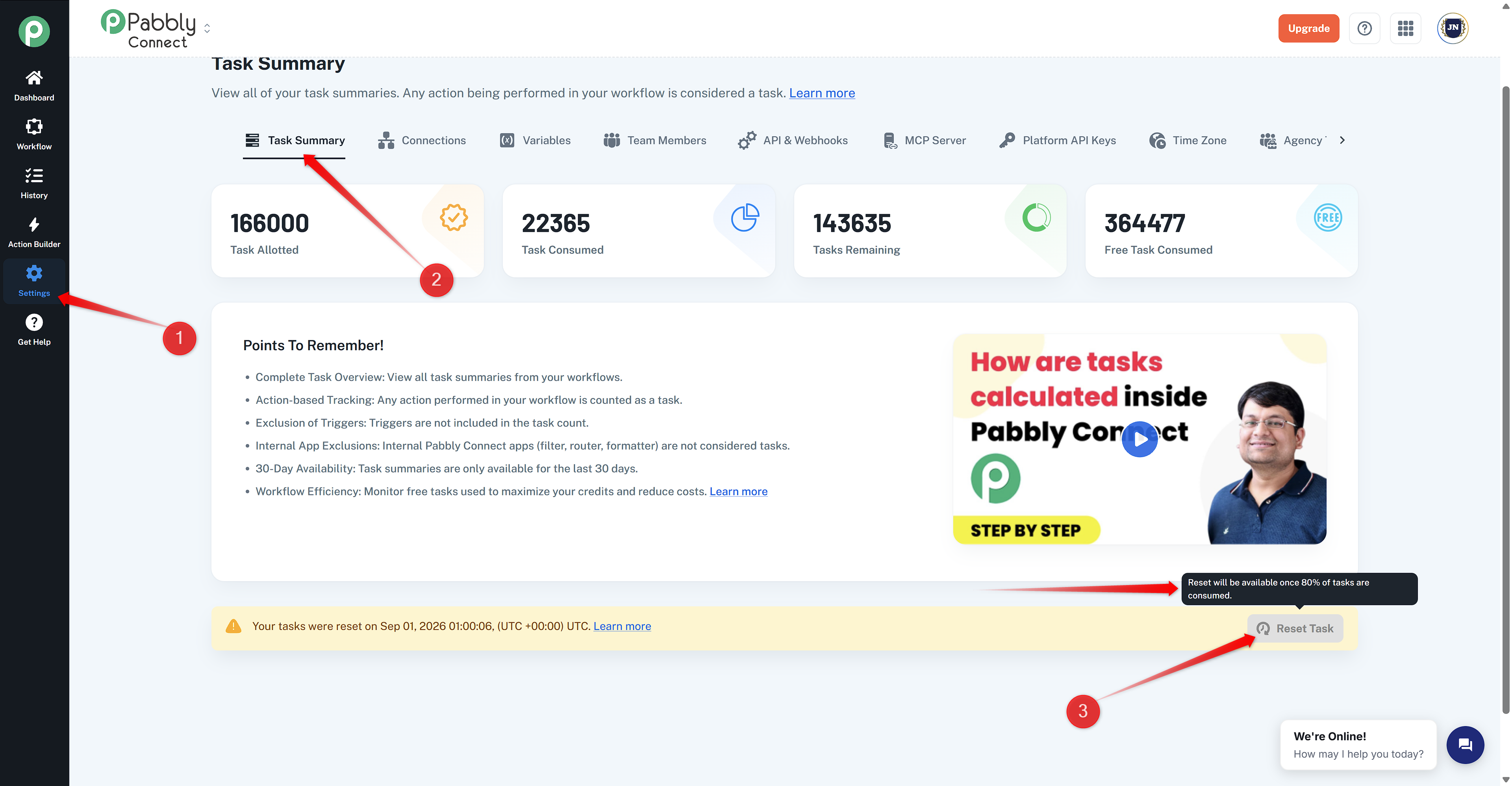
This design gives you effectively unlimited tasks with no downtime, while preventing accidental infinite loops and system abuse. So "Unlimited" means you can keep resetting your task count as you approach the limit, rather than being restricted to a single fixed monthly number.
Thanks & Regards,
Adeel Akhtar
🌐 Pabbly.com