Plain text, send test email, and copy campaign
Status: Open · Asked by Nick Bolton on · 0 views
Hello Nick,
Thanks for contacting us.
1. Add a plain text version of the email so it can send plain text and HTML.
- Yes, when you create an email from scratch, it will give you the option to create an email using the Drag n Drop builder, Rich text editor for plain text emails, and custom HTML Editor for creating emails with HTML code.
2. Send a test. When I've finished making my email - I want to send a test to myself or other emails to verify it's working and looking good. I can't see this option anywhere. So I need to make a new email again.
- Unfortunately, there is no separate send test email option. You can either create a Test list containing all the emails to which you want to send a test email, or can enter email addresses in the Individual email box and then send as a campaign.
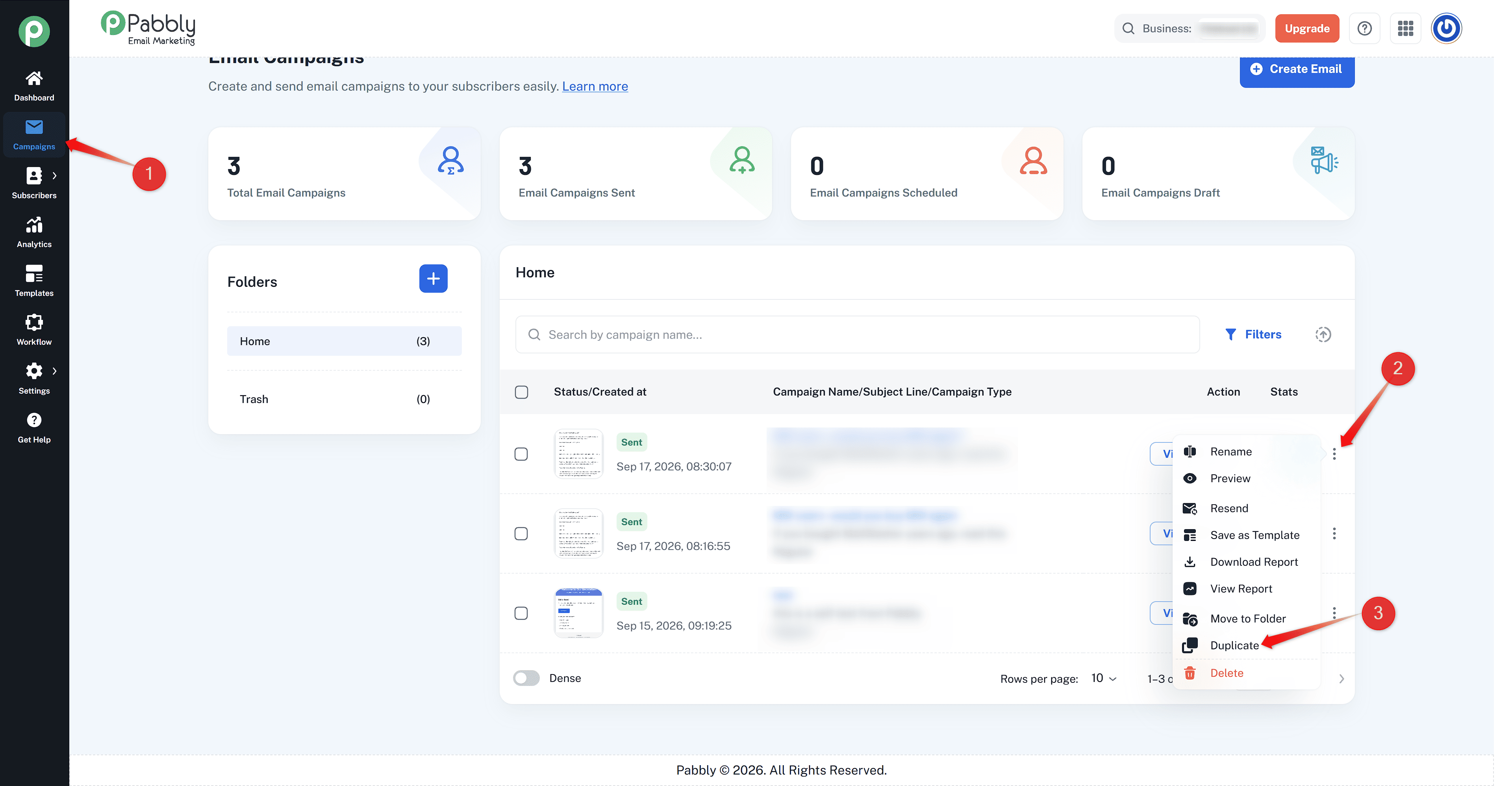
3. I should be able to copy an already sent campaign so I can send to my list after I've sent the test to myself. Plus it's useful if you want to send to different segments on different days.
- Yes, you can create a clone copy of an already sent campaign to edit and then send a new copy of the particular email campaign. You just need tot click on the three dots on the right-hand side of the campaign and then select Duplicate as shown below.
Thanks & Regards,
Adeel Akhtar
🌐 Pabbly.com