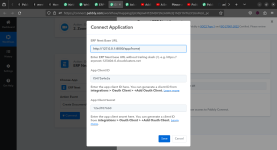
Please authenticate your ERP Next account to allow access to Pabbly Connect.

praful

Member
could not connect with ERP Next why.And dont no what is the next step too. help me
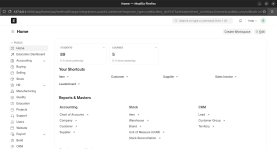
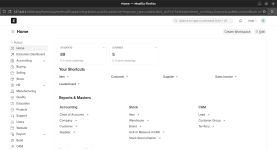
when entering the client secret ,client ID,and erp next base url and pressing the the save button its redirecting to ERP Next home page then what is the next step .There is no allow button but in the videois showing a allow button .
 

Attachments

  • Screenshot from 2024-03-11 22-50-48.png
    Screenshot from 2024-03-11 22-50-48.png
    108.5 KB · Views: 126

praful

Member
When entering the client secret ,client ID,and erp next base url and pressing the the save button its redirecting to ERP Next home page then what is the next step .In Youtube video after saving there is an allow button present .but i cant see any Allow button . I dont no what is the next step .Help Please.


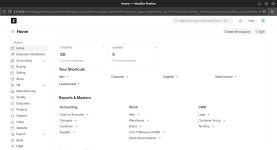
Below screenshot is the redirected page when saving the client secret ,client ID,and erp next base url .
 

Attachments

  • Screenshot from 2024-03-12 10-15-53.png
    Screenshot from 2024-03-12 10-15-53.png
    120 KB · Views: 123
  • Screenshot from 2024-03-11 22-50-48.png
    Screenshot from 2024-03-11 22-50-48.png
    108.5 KB · Views: 131
P

Pabblymember11

Guest
Hey @praful

Regarding your concern, please refer to the following video lesson once and then try making the new connection.

Please try reconnecting it in the incognito mode of the browser
 

praful

Member
Hey @praful

Regarding your concern, please refer to the following video lesson once and then try making the new connection.

Please try reconnecting it in the incognito mode of the browser
I tried again but its not working . I tried in incognito mode also , also Allow button is not showing .its directly redirect to ERP Next Home page.
 

praful

Member
@Supreme In your Suggested video has Option Allow to authorize ERP Next connection ,when i submit client id ,client secret,base url and save there is no new window to allow the authorization .
 

praful

Member
@Supreme In your Suggested video has Option Allow to authorize ERP Next connection ,when i submit client id ,client secret,base url and save there is no new window to allow the authorization .
@Supreme Below screenshot is the direct redirecting page when then we save the client id ,client secret ,and base url .
 

Attachments

  • Screenshot from 2024-03-11 22-50-48.png
    Screenshot from 2024-03-11 22-50-48.png
    108.5 KB · Views: 119
P

Pabblymember11

Guest
Can you please record a short video on how you are connecting your ERP next account?

Also, let us know if you are using a custom domain for your ERP next.
 
A

Arshita

Guest
Hey @praful

Could you kindly provide us with the credentials for the ERP Next application, such as the username and password?

This will allow us to conduct testing from our end and assist you further. Please share the credentials at [email protected] with reference to this thread, and we'll check and help you.
 
Top