

Question: Smartlead to Excel Sheets

Luke

Member
Your Workflow URL
https://connect.pabbly.com/workflow/mapping/IjU3NjUwNTZmMDYzNTA0Mzc1MjZiNTUzNDUxMzci_pc
Your Task History ID
IjU3NjEwNTZiMDYzMDA0MzI1MjZjNTUzNDUxMzM1MTZhNTQzMSI_3D_pc
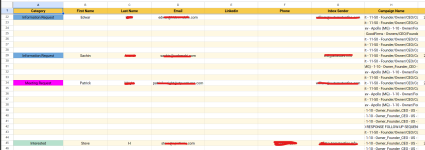
What is the cause for this issue of data being added on the spreadsheet is inconsistent, lots of cells are not being filled.

It does successfully pull all data from Smartlead using webhook when I check the Task.
 

Attachments

  • Screenshot 2023-10-03 140242.png
    Screenshot 2023-10-03 140242.png
    128.6 KB · Views: 95
P

Pabblymember11

Guest
Hey @Luke

Based on your workflow task history, it's evident that your triggering application is generating multiple trigger events. Since you've specifically mapped the trigger response for the "LEAD_CATEGORY_UPDATED" event, it correctly processes that data. However, for other events, the response labels differ, resulting in incomplete entries being filled due to these variations.

1696320264265.png


So, kindly use the Filter action step to only process the workflow for the specific trigger event coming from your triggering application.

 
Top