Recurring Bug in Pabbly Connect V2 – Google Sheets Mapping Breaks After Test Request
Status: Open · Asked by A M on · 0 views
Hello Pabbly Support Team,
I am reporting a recurring mapping issue in Pabbly Connect V2 that is disrupting our production workflows.
1. Problem
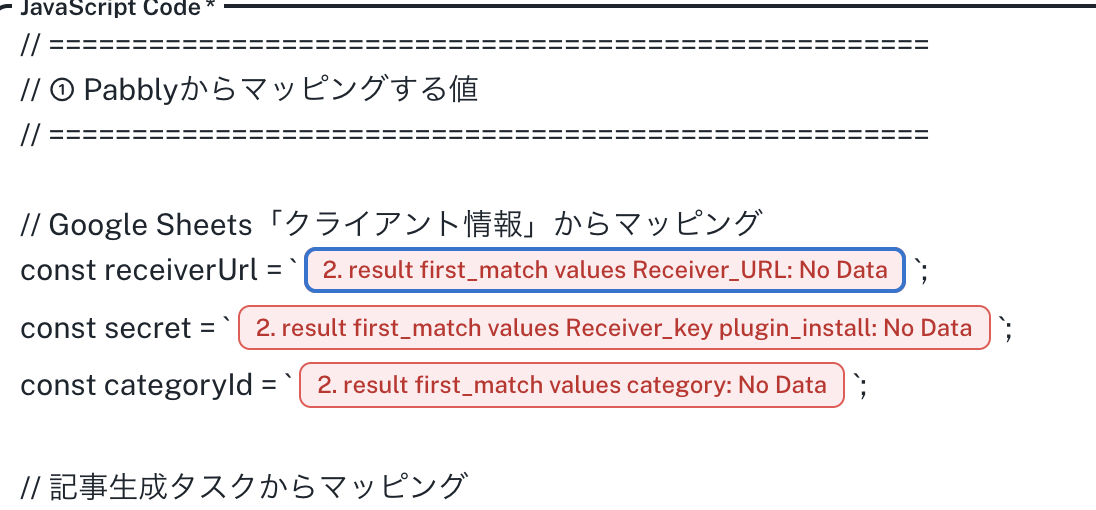
Previously configured Google Sheets mappings become invalid after running a new test request.
Previous mapping path:
2. result first_match values WP文章プロンプト
New mapping path after testing:
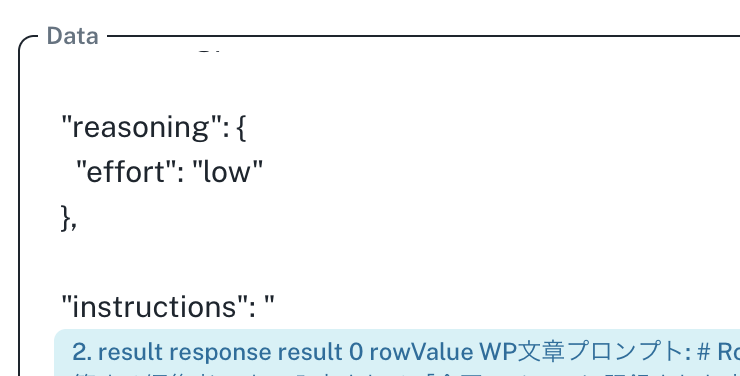
2. result response result 0 rowValue WP文章プロンプト
The output structure changes, and all downstream Google Sheets mappings display "No Data".
2. Business Impact
This problem has occurred repeatedly.
100% of the affected Google Sheets mappings become invalid.
Manual remapping of numerous fields is required each time.
On October 25, 2026, an automated WordPress post failed because of this issue.
Multiple client workflows are potentially affected.
The Google Sheets data itself is correct and has not been removed.
3. Questions for Your Technical Team
Why does the output structure change after a test request?
Why are existing mappings not preserved?
Is this a known issue in Pabbly Connect V2?
Can you provide a permanent fix?
Is there a workaround that avoids repeated manual remapping?
4. Requested Resolution
Please investigate the root cause and provide a permanent solution.
Manual remapping is not an acceptable long-term solution for production automation.
Please do not modify or rebuild our existing workflows without prior approval.
Thank you for your assistance.