Registered time difference

Status: Closed ยท Asked by Ricky Loh on ยท 0 views

Ricky Loh โ€” Question ยท
Lead from FB lead form link to google sheet. Why customer submitted form time and google sheet appear time is difference? 
Normally is one day back. 
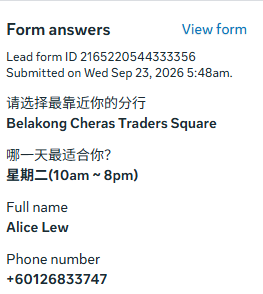
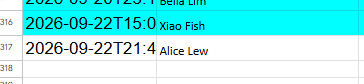
Screenshot 2026-09-23 155136.png
Screenshot 2026-09-23 155123.png
Pabbly Support โ€” Reply ยท

Hello Ricky,

We checked your workflow and execution history (IjU3NjYwNTZmMDYzNTA0MzA1MjZiNTUzMTUxMzA1MTYxNTQzOTBmMzUi_pc).

Why the Time Differs

  • Facebook Trigger Data: The created_time received from the Facebook Lead Ads trigger is always in UTC (2026-09-22T21:48:26+0000), which is what gets added to your Google Sheet.

  • Account Display Time: The time shown in your Facebook lead form screenshot (Sep 23, 5:48 AM) displays according to your local/Meta account timezone (which appears to be UTC+8).

21:48 on Sep 22 in UTC is the exact same moment as 5:48 AM on Sep 23 in UTC+8.

How to Fix:

To save the lead time in your local timezone in Google Sheets:

  1. Add a Date/Time Formatter by Pabbly step after the Facebook Lead Ads trigger.

  2. Select Format Date with Time Zone.

  3. Pass Facebookโ€™s created_time, set From Timezone to UTC, and set To Timezone to your preferred timezone (e.g., Asia/Singapore or Asia/Kuala_Lumpur).

  4. Map the formatted date output into your Google Sheets action step.

Thanks & Regards,
Naman Bansod
Customer Support Specialist
๐ŸŒ Pabbly.com
๐Ÿ‘‰ Rate your support
Ricky Loh โ€” Reply ยท

How to Add a Date/Time Formatter by Pabbly step? where is the button ?

Pabbly Support โ€” Reply ยท

Hello Ricky,

To add the Date/Time Formatter by Pabbly step in your workflow:

  1. Click the + (Plus) button located directly below your Facebook Lead Ads trigger step to create a new action step.

  2. In the Choose App search field, search for and select Date/Time Formatter by Pabbly.

  3. Under Action Event, select Format Date with Time Zone and click Connect.

  4. Configure the settings:

    • Date: Map the created_time field from your Facebook Lead Ads response.

    • From Timezone: Select UTC.

    • To Timezone: Select your preferred local timezone (e.g., Asia/Singapore or Asia/Kuala_Lumpur).

  5. Click Save & Send Test Request, then map this formatted result into your Google Sheets action step.

You can watch a step-by-step video guide on How to Convert Date Time into a Different Time Zone using Pabbly Connect.

Please let us know if you need further assistance!

Thanks & Regards,
Naman Bansod
Customer Support Specialist
๐ŸŒ Pabbly.com
๐Ÿ‘‰ Rate your support
Pabbly Support โ€” Reply ยท

Hello,

Just following up on our previous email to check if you need any further assistance from our end.

Please feel free to let us know if you have any questions or concerns. Weโ€™ll be happy to assist you.

Thanks & Regards,
Naman Bansod
Customer Support Specialist
๐ŸŒ Pabbly.com
๐Ÿ‘‰ Rate your support
Pabbly Support โ€” Reply ยท

Hello!

It seems that the matter has been resolved, as we havenโ€™t received any further queries from your side.

If there are any other concerns, please do let us know. We will be happy to assist you.

Thanks & Regards,
Naman Bansod
Customer Support Specialist
๐ŸŒ Pabbly.com
๐Ÿ‘‰ Rate your support

Back to all forum threads ยท Log in to reply