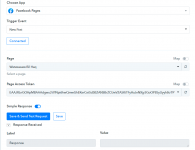
Save and send test request on Facebook page

watawasaw

Member
There is a problem with this app at save and send a test request on Facebook page. An empty label appears as response received at any try as shown on the attached screenshot.
 

Attachments

  • reponse.png
    reponse.png
    42.7 KB · Views: 125
P

Pabblymember11

Guest
Hey @watawasaw

Could you please try re-installing the Pabbly Connect app from your Facebook account by removing it first and then adding it back by re-authorizing it from the Facebook "New Post" Trigger event?

1631333240663.png


Then try authorizing your Facebook account -

2021-10-04_14h07_59.png


After checking that you have all the permission access to your desired pages from Facebook while connecting your account?

2021-10-04_14h07_26.png


Regards
 

BHcc

Member
Hey @watawasaw

Could you please try re-installing the Pabbly Connect app from your Facebook account by removing it first and then adding it back by re-authorizing it from the Facebook "New Post" Trigger event?

View attachment 5403

Then try authorizing your Facebook account -

View attachment 5404

After checking that you have all the permission access to your desired pages from Facebook while connecting your account?

View attachment 5405

Regards

Hello sir,

I have tried this to no avail. When I authorised it, I ensured all the pages were checked. However, when I tried the save and send a test request again, it still doesn't show up for that one Facebook page, though it did show up for another. Could you kindly advice please?

Thank you.
 
P

Pabblymember11

Guest
Hey @BHcc

Could you please follow the steps mentioned and please check again in your Facebook account that you have authorized the permissions to the respective Page in the Business Integration section.
Could you please try re-installing the Pabbly Connect app from your Facebook account by removing it first and then adding it back by re-authorizing it from the Facebook "New Post" Trigger event?

1631333240663.png
 

BHcc

Member
Hey @BHcc

Could you please follow the steps mentioned and please check again in your Facebook account that you have authorized the permissions to the respective Page in the Business Integration section.
Hello @Supreme

I have done the steps twice now, and double checked the permissions in the Business Integration section. Everything is ticked/blue.
 
Top