Twin
Member
Hi,
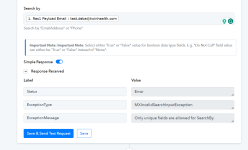
I'm trying to connect Calendly with Leadsquared. While all the setup has been done but on adding 'Search by' as an email it is showing as an error and is being mentioned as 'Only unique fields are allowed for SearchBy.'. Can you help me understand what the issue is as I believe I have added the unique field itself.
Regards
Debasish
I'm trying to connect Calendly with Leadsquared. While all the setup has been done but on adding 'Search by' as an email it is showing as an error and is being mentioned as 'Only unique fields are allowed for SearchBy.'. Can you help me understand what the issue is as I believe I have added the unique field itself.
Regards
Debasish