inochi
Member
- Your Workflow URL
- https://connect.pabbly.com/workflow/mapping/IjU3NjUwNTZkMDYzNjA0MzI1MjY0NTUzYzUxMzAi_pc
- Your Task History ID
- IjU3NjUwNTZkMDYzNjA0MzI1MjY0NTUzYzUxMzAi_pc
Hello,
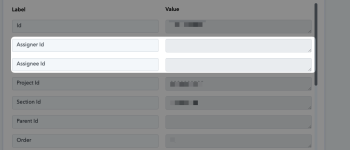
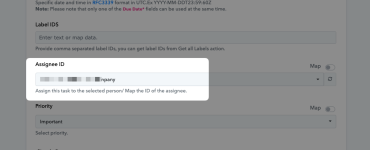
I'm encountering some issues with the Todoist integration. When I try to add a label (I've tried using both the textual name and the ID), it's not working as expected. I'm also having trouble with task assignment (I've tried using the email from the dropdown menu and adding the ID with the "map" toggle activated).
Neither the task assignee nor the label is displayed (see screenshot).
How can I solve that?
Thanks
I'm encountering some issues with the Todoist integration. When I try to add a label (I've tried using both the textual name and the ID), it's not working as expected. I'm also having trouble with task assignment (I've tried using the email from the dropdown menu and adding the ID with the "map" toggle activated).
Neither the task assignee nor the label is displayed (see screenshot).
How can I solve that?
Thanks