Ej Tushar
Member
Dear Pabbly Support Team,
I am experiencing an issue with my WhatsApp automation workflow setup following your tutorial video:
Issue Summary:
1. I have successfully followed all steps in the tutorial for automating Shopify order notifications via WhatsApp using Pabbly Connect and Pabbly Chatflow
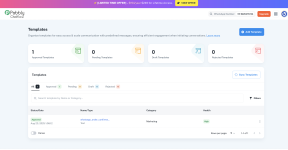
2. My WhatsApp message template is approved and shows as active
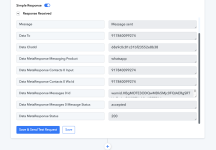
3. The workflow shows "Response Received" in the Pabbly dashboard during test runs
4. However, no WhatsApp messages are being delivered to the recipient
My Setup:
1. Trigger: Shopify New Order (working correctly - captures order data)
2. Action: Pabbly Chatflow - Send Template Message
3. Template Status: Approved
4. Webhook: Successfully configured and receiving responses
5. WhatsApp Number: +91 9220476744
I am experiencing an issue with my WhatsApp automation workflow setup following your tutorial video:
Issue Summary:
1. I have successfully followed all steps in the tutorial for automating Shopify order notifications via WhatsApp using Pabbly Connect and Pabbly Chatflow
2. My WhatsApp message template is approved and shows as active
3. The workflow shows "Response Received" in the Pabbly dashboard during test runs
4. However, no WhatsApp messages are being delivered to the recipient
My Setup:
1. Trigger: Shopify New Order (working correctly - captures order data)
2. Action: Pabbly Chatflow - Send Template Message
3. Template Status: Approved
4. Webhook: Successfully configured and receiving responses
5. WhatsApp Number: +91 9220476744