Workflow on New interface not working
Status: Closed · Asked by Eileen Chieng on · 0 views
Hi Pabbly team, after i migrate to the new inteface, the workflow is not trigger after i updated the worksheet (step 1) pls help https://connect.pabbly.com/v2/app/workflow/mapping/IjU3NjYwNTZhMDYzNzA0MzU1MjZlNTUzYzUxMzIi_pc
Hello Eileen,
Thank you for reaching out.
We have monitored and reviewed your workflow’s task history and confirmed that it is executing successfully following the migration to the new interface.
Could you please provide more details regarding where you are experiencing issues or what specific behavior you are observing? This information will help us investigate the matter further for you.
thaanks will observe again,
as just now when a new was made, the action was triggerd for previous entry hence resulting to duplicate entires on the last step.
Hello Eileen,
Thank you for the update.
Please continue monitoring the workflow and let us know if the issue occurs again.
We understand that the latest entry was processed when a new entry was created, resulting in duplicate entries at the final step. If this happens again, please share the approximate time of the occurrence and the corresponding Task History IDs so we can investigate why the previous entry was processed again.
HI Pabbly team, at open of creating this thread, I have 100 unconsumed task.
After you replied, my 100 task are fully consumed.... pls help check... thanks
Hello!
As we have checked, your workflows are working correctly and have consumed all 100 tasks available on your free plan. To continue using Pabbly Connect, you will need to purchase a suitable plan.
You can view the available plans and pricing here: https://www.pabbly.com/connect/#pricing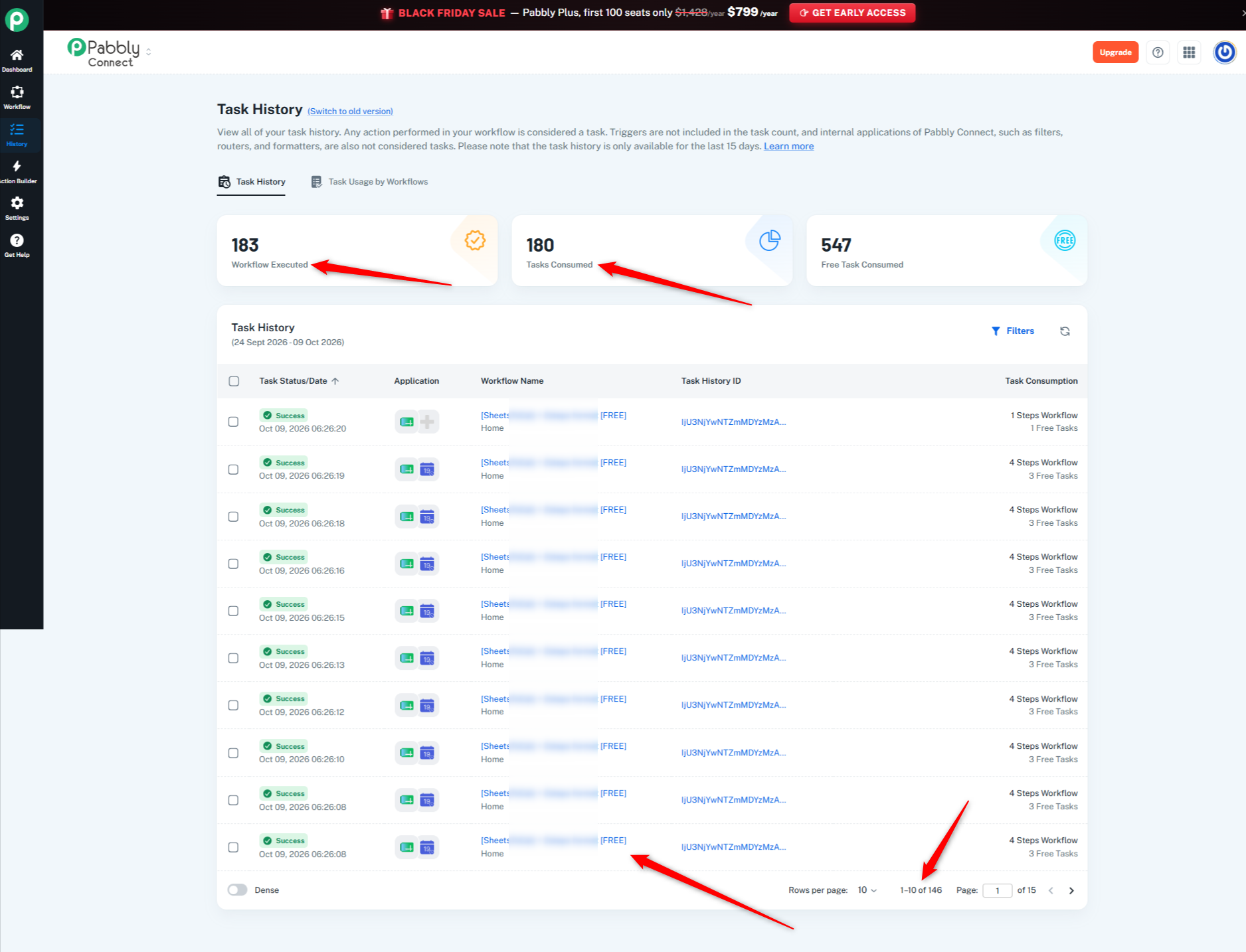
Thanks & Regards,
Soumya Tripathi
Customer Support Lead
🌐 Pabbly.com
🎉Black Friday Early Access
Hi Pabbly team,
thats what i observed, , after i migrate to the new inteface, i only added ONE entry to the google sheet to trigger step1.
but the workflow re-trigger what was already om the googlesheet and updated the calendar once again. And it consume 100 task instead of 1.
https://connect.pabbly.com/v2/app/workflow/mapping/IjU3NjYwNTZhMDYzNzA0MzU1MjZlNTUzYzUxMzIi_pc
Hello Eileen,
We reviewed the Task History and found that each workflow execution has a different row index and soft booking number in the Google Sheets trigger data.
Could you please check whether any new updates or entries were received in the Google Sheet apart from the changes you made?
If there were any, please share a screenshot of the Google Sheet showing the update you made and the new entry received. This will help us compare the data with the Task History and investigate why the previous entry was processed again, resulting in duplicate entries as mentioned by you.
Hi Pabbly,
#1. is only when there is an new/update to the row. And for me it will be the updates made in column E. (see image below).
then a trigger is made to format the date and then have this update show up in my google calendar as an event,.
I have not made any changes except migrating to the new interface.
So yesterday when I enter text into cell E2, past entries in column E showed up again as google calendar events which ate into my 100 free tasks untility.
please advise

Hello Eileen,
Thank you for the additional details.
We reviewed the execution data you shared and confirmed that the Google Sheets trigger returned RowIndex 2 in the sample execution, and the subsequent date formatting and Google Calendar event creation steps completed successfully. However, we still need to investigate why previously existing entries were processed again after the interface migration.
As a one-time exception, we have reset your tasks to help you continue using Pabbly Connect while we investigate this issue.
To help us identify the cause, please share the following:
Google Sheet access: Share the Google Sheet link and grant Editor access to both support@pabbly.com and naman.bansod@pabbly.com.
Task History IDs: Share the Task History IDs of 2–3 executions that processed previously existing rows after you updated cell E2.
Duplicate entries: If possible, share a screenshot of the affected rows in your Google Sheet (columns A–E) and the corresponding duplicate events in Google Calendar.
We will compare the sheet data with the workflow execution records to investigate why those entries were processed again.
Please avoid repeatedly testing the live workflow for now, as each successful execution may consume tasks.
Also, if you feel like these details need to be shared privately, then forward them to support@pabbly.com, and we'll take the conversation further there.
Hi Pabbly,
added you as Editor and i did a test entry, here's the video screenshot
https://www.loom.com/share/8ef2ab7b786841759d571302219de92f
Task ID IjU3NjYwNTZmMDYzMzA0MzI1MjZmNTUzMTUxMzU1MTY0NTQzMzBmMzIi_pc
Hello Eileen,
Thank you for sharing the Loom video and the Task History ID.
Upon reviewing the execution details for Task ID IjU3NjYwNTZmMDYzMzA0MzI1MjZmNTUzMTUxMzU1MTY0NTQzMzBmMzIi_pc, we observed the following:
Blank / No Data Trigger Output: In this execution, the Google Sheets (New or Updated Spreadsheet Row) trigger executed successfully, but its output data returned "No Data Received".
DateTime Formatter Failure: Because the trigger did not return any row values, the subsequent DateTime Formatter step failed with a
422 Error: Required field Date missing, halting the workflow execution.
As a result, this specific Task ID did not process duplicate calendar entries—it failed at step 2 due to missing trigger data.
To help us investigate the exact issue with duplicate re-triggers:
Task History IDs: Could you please share 2–3 Task History IDs from your history list that processed previously existing rows after you updated cell E2.
Screenshots: If possible, please share a screenshot of the earlier affected rows in your Google Sheet alongside the corresponding duplicate entries created in Google Calendar.
In the meantime, please open your workflow, re-test the Google Sheets trigger by clicking Fetch Test Data, and ensure all required fields are correctly mapped in the DateTime Formatter step.
Oct 11 - 41 task were executed when I only delete 3 contents from 3 rows
Oct 9 = 48 task
here are some history ID:
Oct 11
IjU3NjYwNTZmMDYzMzA0MzI1MjZmNTUzMjUxM2E1MTYzNTQzNTBmMzki_pc
Oct 9
IjU3NjYwNTZmMDYzMzA0MzA1MjZkNTUzNTUxMzE1MTZhNTQzMjBmMzci_pc
Sep 28
IjU3NjYwNTZmMDYzMjA0MzQ1MjY0NTUzYzUxMzM1MTZiNTQzNDBmMzki_pc
The duplicates were from row 35, Nov 19 onwards in col E. (see attached)
EC Dates Availability.xlsx (62.9 KB)
Hi Eileen,
Thank you for sharing the Task History IDs and the spreadsheet.
To investigate this further and work toward a proper resolution, we would like to arrange a meeting with you so we can review the workflow configuration, trigger behavior, and affected execution records together.
Please book a convenient time using the link below:
Schedule a Meeting with Our Team
During the meeting, we can examine the issue in detail and determine the next steps toward resolving it.
HI Pabbly team,
thanks - the link is no longer valid, please help provide a new link to Schedule a Meeting with your Team
Eileen Chieng:
HI Pabbly team, thanks - the link is no longer valid, please help provide a new link to Schedule a Meeting with your Team
Hi Pabbly team,
previous entry which triggers an event to be updated on my google calendar is triggered again. This is getting rather annoying as I have to spend time (again) to remove the duplicate entries (see attached)


Hi Eileen,
Please book a convenient time using the link below:
https://www.draftmeet.com/book/lnk_537943cf67b2594884354e2307e03244
During the meeting, we can examine the issue in detail and determine the next steps toward resolving it.
Hi Eileen,
Thank you for your patience and for meeting with us to go over this issue.
As discussed during our meeting, we tested one record to investigate the duplicate calendar entries and observed double bookings on your Google Calendar. Upon checking the Pabbly Connect Extension on your Google Sheet, we noticed two events configured in the extension. We requested that you select 1 active event to prevent duplicate execution, and upon re-testing, the workflow executed successfully as expected.
Since the issue has been resolved, we are marking this ticket as Closed.
As promised during our discussion, we have reset your free task quota for the last time. Please note that once these tasks are consumed, you will need to upgrade to a paid plan to continue running your workflows without interruption. You can review our available plans and pricing anytime here: https://www.pabbly.com/connect/#pricing
Thank you for choosing Pabbly Connect! Please let us know if you have any questions.