printcase
Member
- Consent to Access & Modify
- I authorize Pabbly Support to log in to my account and make changes to the specified workflow for troubleshooting.
Dear Support Team,
I am writing to request assistance with a phone number formatting issue in our WooCommerce store.
Issue Description:
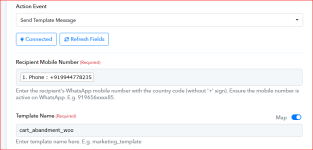
Currently, when customers enter their phone number with a country code (e.g., +919944****35) in the checkout phone field, the plus sign (+) is being stored and passed through the system. However, for our third-party integrations (such as WhatsApp template messaging), we require phone numbers without the + sign.
But why does the integration between Pabbly Connect and Pabbly Chatflow require phone numbers without the + before the country code?
Impact:
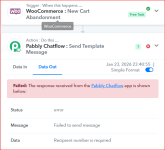
This issue affects our automated WhatsApp messaging system, which expects phone numbers without the + prefix.
Request:
Could you please implement a solution to automatically remove the + sign from phone numbers entered in both the billing and shipping phone fields?
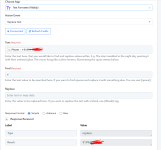
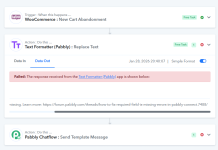
I have already explored some code-based solutions, but it's not working. I would prefer an official implementation or guidance from your team to ensure compatibility and maintain best practices.
I am writing to request assistance with a phone number formatting issue in our WooCommerce store.
Issue Description:
Currently, when customers enter their phone number with a country code (e.g., +919944****35) in the checkout phone field, the plus sign (+) is being stored and passed through the system. However, for our third-party integrations (such as WhatsApp template messaging), we require phone numbers without the + sign.
But why does the integration between Pabbly Connect and Pabbly Chatflow require phone numbers without the + before the country code?
Impact:
This issue affects our automated WhatsApp messaging system, which expects phone numbers without the + prefix.
Request:
Could you please implement a solution to automatically remove the + sign from phone numbers entered in both the billing and shipping phone fields?
I have already explored some code-based solutions, but it's not working. I would prefer an official implementation or guidance from your team to ensure compatibility and maintain best practices.