Replied Cloned Form sends customers to wrong Payment Page

Hello Everyone,

I recently cloned a working form (which copied the working PayPal Codes), but the cloned form takes customers to a different PayPal payment page.

Unfortunately the "bad" Paypal payment page also fails to send out Pabbly Payment Received notifications (see this post).

Original Form:
The working Payment page has a "Review Order" button:
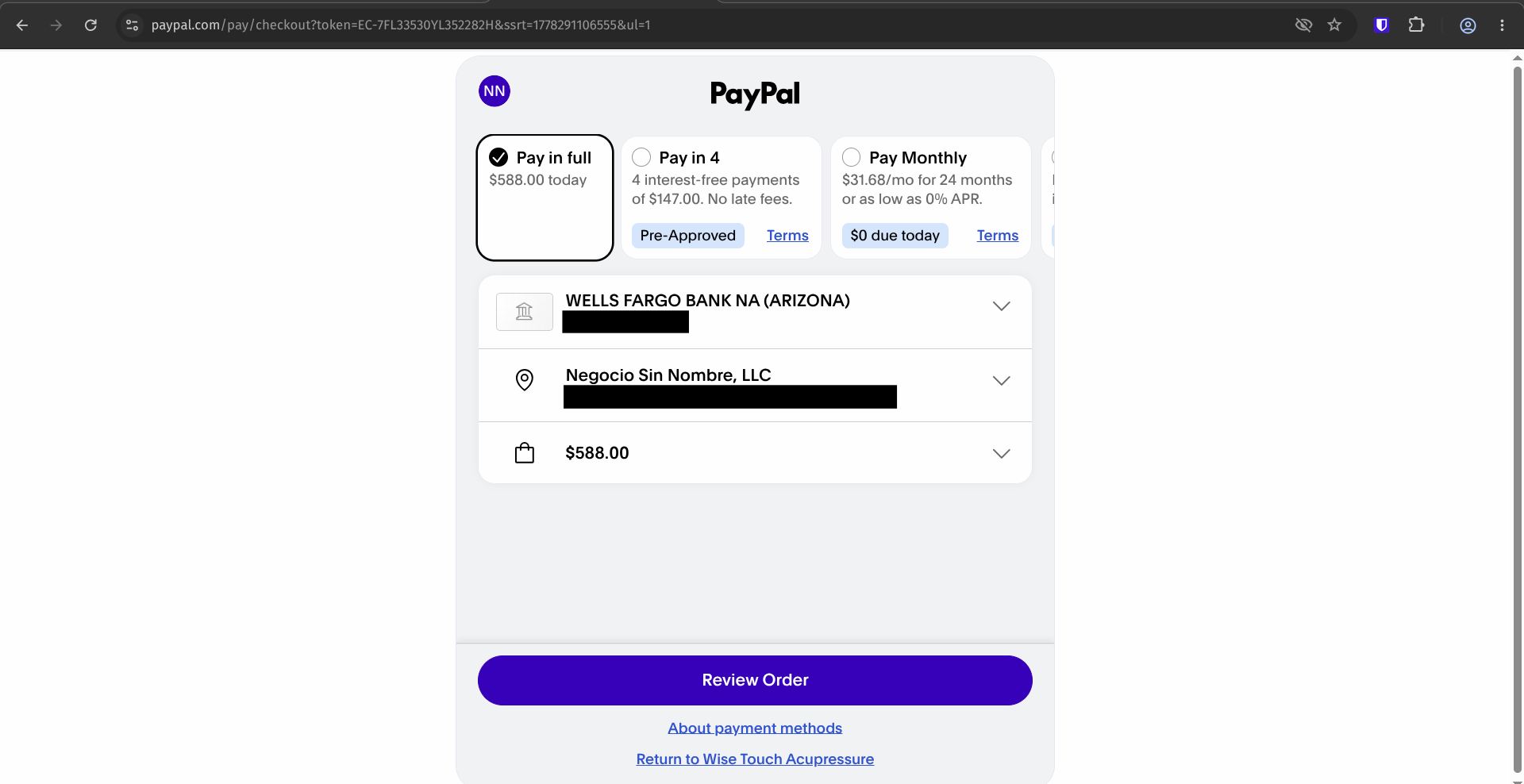
WorkingTestPurchase.jpg


Cloned Form:

The "bad" Payment page has a "Complete Purchase" button:
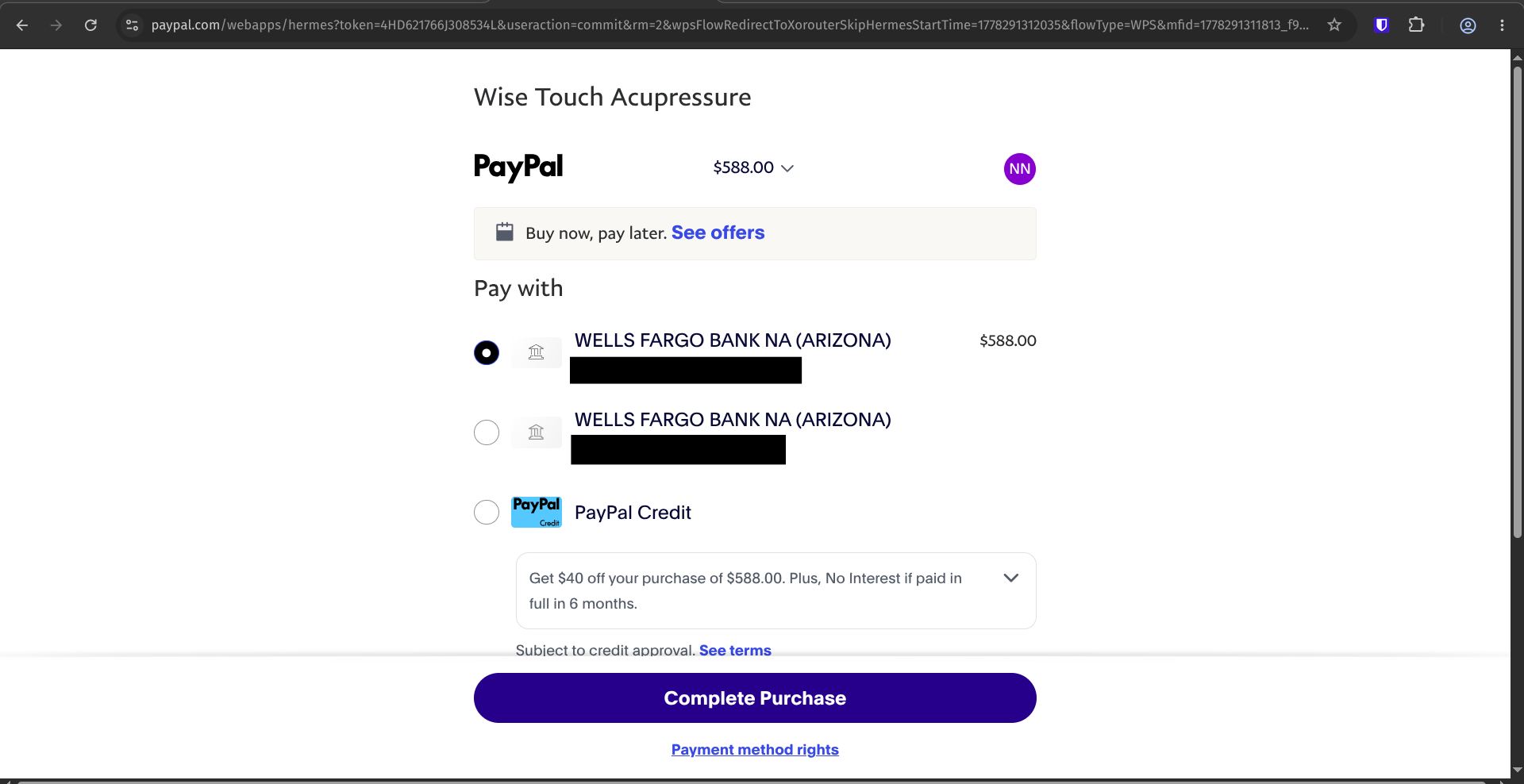
CloneTestPurchase.jpg


I checked both payment modules and the PayPal email id, secret key and client id are the same.

How could a cloned Form take customers to a different PayPal page?
Is there a way to make sure that customers go to the "Review Order" page instead?
 

Preeti Paryani

Well-known member
Staff member
Hey @JSJSMB Norman,

Could you please share the email address associated with your Pabbly Form Builder account?

Once we have it, we will be able to check both forms from our end and investigate why the cloned form is redirecting users to a different PayPal payment page.
 
The Pabbly Form Builder account has the [email protected] address.

I also noticed that the cloned "bad" form goes to this web address:
paypal.com/webapps/hermes?...

but the original form goes to a different address:
paypal.com/pay/checkout?...

Is there a setting in Pabbly (or maybe in PayPal?) to always use the "pay/checkout" address?
 
Last edited:

Preeti Paryani

Well-known member
Staff member
Hey @JSJSMB Norman,

Thanks for sharing the email address.

We checked both of your forms from our end, however on the Enrol button there is currently no redirect URL configured within either of the forms. Due to this, it is difficult for us to determine how the redirection is occurring and why it is redirecting to different PayPal URLs.

Could you please confirm how the redirect process is being triggered in your setup? This will help us investigate the behavior further.
 
Susie, the instructor, created a webhook connection in her PayPal account and sent me the Client ID and Secret Key, which I entered into the Form's PayMent Module.

This is the method we have used for all the forms.
 

Preeti Paryani

Well-known member
Staff member
Hey @JSJSMB Norman,

Thank you for confirming the setup method.

We checked both forms from our end, however the URLs we are being redirected to are different from the examples you shared earlier.

For reference, here are the URLs we observed:

Original Form
Signup: 2026-04 Portland STC with Susie Plettner
https://forms.pabbly.com/view_new/form/swUG-722617331

Redirecting to:
https://www.paypal.com/webapps/hermes?token=EC-62Y4818189827293N

Cloned Form
Signup: 2026-08 San Diego STC with Susie Plettner
https://forms.pabbly.com/view_new/form/MCEo-722619252

Redirecting to:
https://www.paypal.com/webapps/herm...flowType=WPS&mfid=1778476429392_f82354197df97

Since the issue is not replicating consistently on our end, it would be really helpful if you could share a short screen recording showing the exact checkout pages and redirects you are seeing, along with the final page URL.

Once we have that, we will be able to escalate this concern further to the appropriate team for deeper investigation.
 
I have attached videos of the Portland and San Diego Forms.

I also took screenshots of the different PayPal pages with their different URL web addresses.
Portland (goes to PayPal page which successfully sends out Pabbly Payment notification emails):
Portland-ReviewOrder109.jpg


San Diego (cloned form goes to PayPal page which causes Pabbly payment notification emails to fail):
SanDiego-CompletePurchase131.jpg
 
Last edited:
Btw have uploaded the two MP4 videos several times and the Forum shows them added next to the uploaded images, but I do not see them attached to my last post.

Let me know if you did not receive the videos.
 

Preeti Paryani

Well-known member
Staff member
Hello,

We checked your reply from our end, but we could not find any videos attached to the forum post.

What we would recommend is:

• Please record the videos again if needed
• Upload them to Google Drive
• Enable the “Anyone with the link can view” sharing permission
• Then share the Google Drive URLs with us here

This will help us properly review the Portland and San Diego form behavior along with the PayPal redirection differences and investigate the issue further.

We look forward to your response.
 

Preeti Paryani

Well-known member
Staff member
Hey @JSJSMB Norman,

Thank you for your patience.

Our team has made some changes regarding the reported issue. Could you please check the behavior of the forms from your end now and let us know how it goes?
 
It worked - the San Diego form went to the "Review Order" page!

What was changed? And if I clone the San Diego form, will it reliably go to the "Review Order" page from now on?

Also, there are other cloned forms that have the same error - they now go to the "Complete Purchase" page instead of "Review Order".

Can these forms be fixed as well?
Chus Arias - Harmonizing Pain with JSJ

Jill Pasquinelli - JSJ for Distance Practice
 

Preeti Paryani

Well-known member
Staff member
Hey @JSJSMB Norman,

Thank you for the update and for confirming that the San Diego form is now working as expected.

Regarding your questions about what was changed, whether future clones will reliably use the same PayPal flow, and whether the same fix can be applied to the other affected forms, please allow us some time to confirm these details with our technical team.

We have shared your questions with them and will get back to you as soon as we receive a confirmation.

We appreciate your patience.
 

Preeti Paryani

Well-known member
Staff member
Hey @JSJSMB Norman,

Thank you for the update and for confirming that the San Diego form is now working as expected.

Regarding your questions about what was changed, whether future clones will reliably use the same PayPal flow, and whether the same fix can be applied to the other affected forms, please allow us some time to confirm these details with our technical team.

We have shared your questions with them and will get back to you as soon as we receive a confirmation.

We appreciate your patience.
 

Preeti Paryani

Well-known member
Staff member
Hey @JSJSMB Norman,

Thank you for your patience.

We received an update from our technical team regarding the issue.

There was a problem with the payment configuration cloning process when the forms were cloned. Additionally, we found that certain form titles contained restricted words (such as "Signup") and special characters like ":" which were preventing the payment configuration from being saved correctly. We renamed the affected forms by removing those values and re-saved the payment settings.

Regarding your questions:

1. What was changed?
The form titles were updated to remove restricted words/special characters, and the payment configuration was saved again. This resolved the issue and restored the expected PayPal checkout behavior.

2. If I clone the San Diego form again, will it reliably go to the "Review Order" page?
Yes, the expected behavior is that a cloned form should function exactly the same as the form it was cloned from. You may try cloning the San Diego form again and test it. If you encounter any issues, please let us know.

3. What is the expected behavior of cloned forms going forward?
Cloned forms should inherit the same payment configuration and checkout behavior as the source form and should redirect users through the same PayPal flow.

4. Can the other affected forms be fixed as well?
Yes. We checked the other reported forms and found the same issue. The words like "Signup" and the ":" character in the form titles were preventing the payment configuration from being saved properly. We have updated the titles and re-saved the payment settings, so both forms should now be functioning correctly as well.

Please test the forms from your end and let us know how it goes.
 
Top