Details not being sent from the excel file to the recipients

Status: Closed Β· Asked by John Kalambayi on Β· 0 views

John Kalambayi β€” Question Β·
Dear team, 

I tried a test to send messages, in my excel file from the attached, the details are correctly written but then in the messages, the details do not show only the $details. We did everything correct from importing the column name but it is only taking the name not the details.
Find attached the excel file and the screenshot. 
Please check the templates where i am using details and let me know if i should fix it from the templates

Regards,
Pabbly Support β€” Reply Β·

Dear John,

Thank you for reaching out!

Upon reviewing your account, we found that the tags have been mapped within the Contact List, and the label β€œDetails” has also been selected. However, the corresponding custom field/value has not been mapped. As a result, the system is fetching the default template name instead of the actual Excel data.

We request you to perform the Bulk Import action within the Contact List and ensure that the required custom field values are mapped correctly. Kindly refer to the attached screenshot and make the necessary corrections.
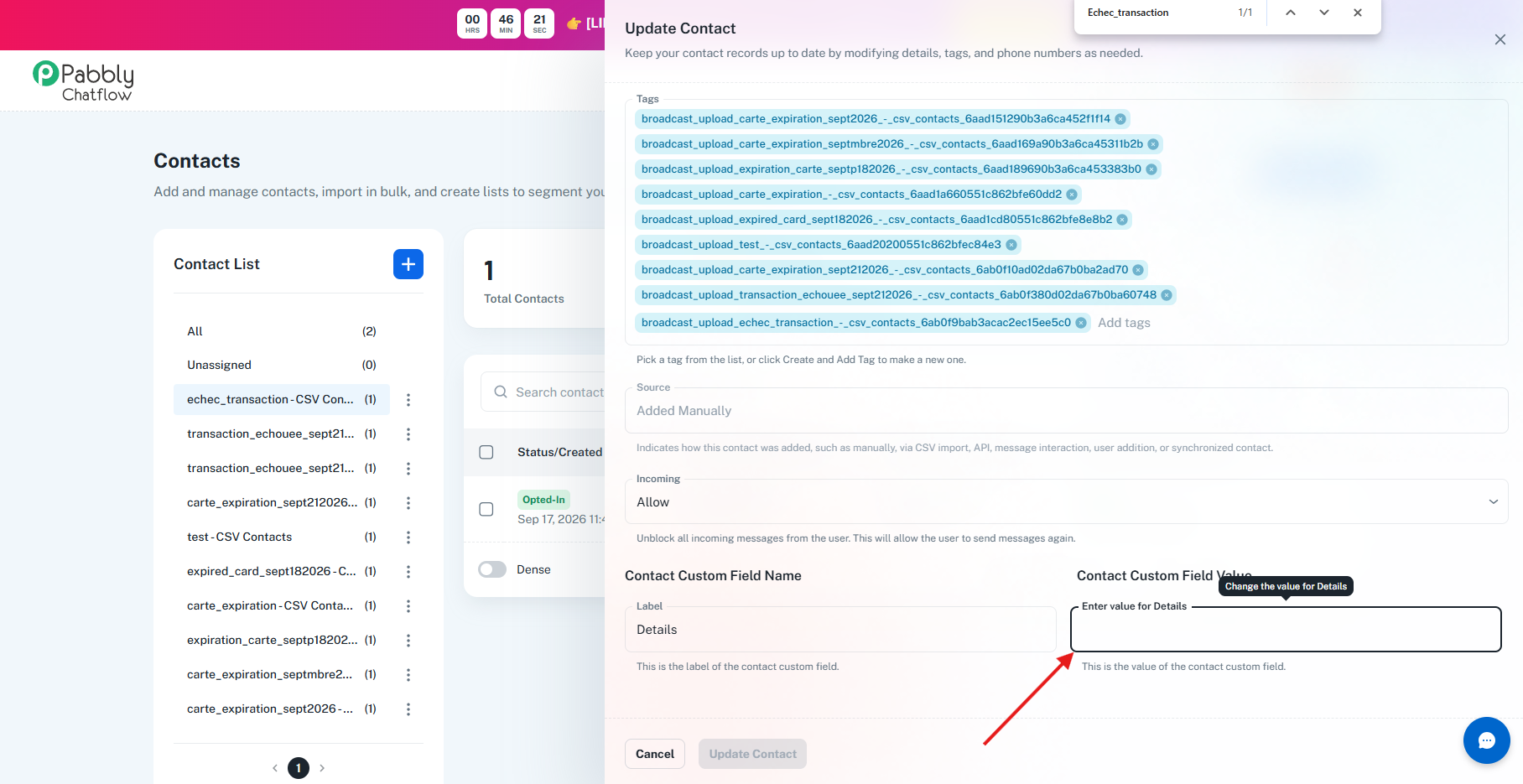
image.png

If you continue to face any issues after making these changes, please feel free to reach out to us, and we will be happy to assist you further.

Thanks & Regards,

Shekh Dilshekh

Customer Support Specialist

🌐 Pabbly.com

πŸ‘‰ Rate your support


John Kalambayi β€” Reply Β·

how can we directly map it from the templates so we do not need to set it everytime

Pabbly Support β€” Reply Β·

Dear John,

Please be informed that your Contact Custom Field is already mapped within the template. We have only guided you to add the same Contact Custom Field value to your CSV file and then bulk-import the contact list.

After following these steps and once the contacts are successfully uploaded, kindly share a test message and check whether you still face the same issue when sharing the template. This will help us investigate the issue further and assist you accordingly.

Thanks & Regards,

Shekh Dilshekh

Customer Support Specialist

🌐 Pabbly.com

πŸ‘‰ Rate your support


John Kalambayi β€” Reply Β·

we tried mapping but it requires us to write manually, now we can not do that for 100 numbers for example.
where we just called the column, it is not showing
with our previous number it was working correctly but since we changed number it does not work anymore.

image.png

Pabbly Support β€” Reply Β·

Dear John,

Please be informed that your Contact Custom Field is already mapped within the template.

Also, we request you to make sure that the Contact Custom Field values are populated in your CSV file. If yes, only then it'll be mapped within Chatflow's Custom field.

Still, if the issue persists, kindly share the same CSV file with us. This will help us investigate the issue further and assist you accordingly.

Thanks & Regards,

Shekh Dilshekh

Customer Support Specialist

🌐 Pabbly.com

πŸ‘‰ Rate your support


Pabbly Support β€” Reply Β·

Dear John,

This is a follow-up regarding the Contact Custom Field mapping. As shared earlier, the Contact Custom Field is already mapped within the template.

Kindly ensure that the corresponding Contact Custom Field values are populated in your CSV file. The values will only be mapped to the Chatflow Custom Field if they are available in the CSV data.

If the issue still persists, please share the CSV file with us so that we can review it and assist you further.

Looking forward to your response.

Thanks & Regards,

Shekh Dilshekh

Customer Support Specialist

🌐 Pabbly.com

πŸ‘‰ Rate your support


Pabbly Support β€” Reply Β·

Dear John,

This is a final follow-up regarding the Contact Custom Field mapping. As shared earlier, the Contact Custom Field is already mapped within the template.

Kindly ensure that the corresponding Contact Custom Field values are populated in your CSV file, as the values will only be mapped to the Chatflow Custom Field when they are available in the CSV data.

If you are still experiencing the issue, please share the CSV file with us so that we can review the data and assist you further.

As we have not received the requested details, we will be closing this ticket for now. If you still need assistance, simply reply to this email with the CSV file, and we will be happy to look into it further.

Thanks & Regards,

Shekh Dilshekh

Customer Support Specialist

🌐 Pabbly.com

πŸ‘‰ Rate your support


Back to all forum threads Β· Log in to reply