Dynamic placeholder not resolving in Postmark email
Status: Closed · Asked by Sven Bosau on · 0 views
I’m having an issue with a Pabbly Connect workflow where a dynamic placeholder in a Postmark email is no longer being resolved correctly.
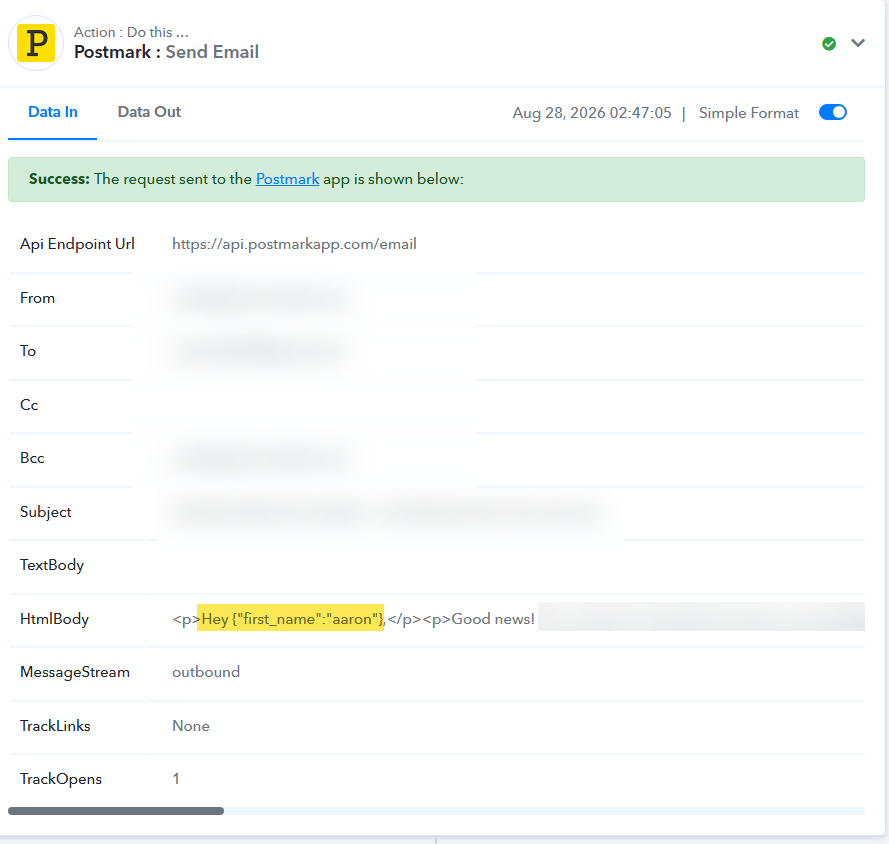
This was working correctly in the past. Today, the workflow executed successfully, but instead of replacing the placeholder with the customer’s name, the email contained the placeholder data itself.
For example, I expected:
“Hey Aaron,”
But the email was sent as:
“Hey {"first_name":"aaron"},”
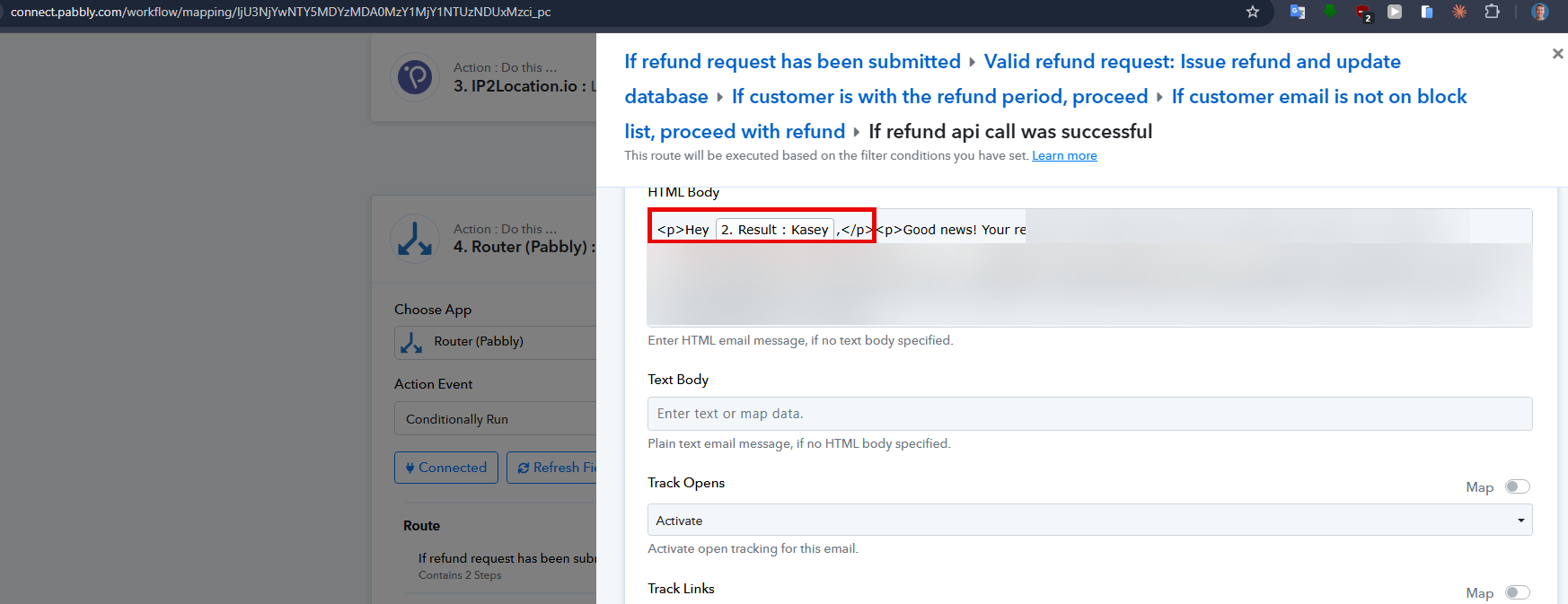
The issue occurs in the Postmark step, specifically in the HTML Body field.
Task history: IjU3NjYwNTZmMDYzNjA0MzY1MjY1NTUzMTUxM2I1NTQzMDBmMzUi_pc
Workflow: IjU3NjYwNTY5MDYzMDA0MzY1MjY1NTUzNDUxMzci_pc
Could you please investigate why the placeholder is no longer being parsed correctly? Nothing was intentionally changed on my side, and this functionality worked previously.
Thanks,
Sven
Hello Sven,
Thank you for reaching out and for the detailed description of the placeholder issue in your Postmark email step.
Based on what you've described, the email is receiving the raw placeholder data (e.g. {"first_name":"aaron"}) instead of the actual value. This typically happens when the field in the Postmark action step is not mapped dynamically from a previous step's output, or when the trigger response structure/label names have changed, causing the mapped field to pass through the raw token instead of the resolved value.
As the First name that you mapped in the PostMark action is dependent on the previous Text Formatter action, the mapped is showing as Invalid in that because the trigger label captured later has changed. Kindly update the mapping with the correct mapping and then test the workflow.

Thanks & Regards,
Adeel Akhtar
🌐 Pabbly.com
Hello Sven,
Thank you for reaching out and for the detailed description of the placeholder issue in your Postmark email step.
Based on what you've described, the email is receiving the raw placeholder data (e.g. {"first_name":"aaron"}) instead of the actual value. This typically happens when the field in the Postmark action step is not mapped dynamically from a previous step's output, or when the trigger response structure/label names have changed, causing the mapped field to pass through the raw token instead of the resolved value.
As the First name that you mapped in the PostMark action is dependent on the previous Text Formatter action, the mapped is showing as Invalid in that because the trigger label captured later has changed. Kindly update the mapping with the correct mapping and then test the workflow.

Thanks & Regards,
Adeel Akhtar
🌐 Pabbly.com
Hello Sven,
Thank you for reaching out and for the detailed description of the placeholder issue in your Postmark email step.
Based on what you've described, the email is receiving the raw placeholder data (e.g. {"first_name":"aaron"}) instead of the actual value. This typically happens when the field in the Postmark action step is not mapped dynamically from a previous step's output, or when the trigger response structure/label names have changed, causing the mapped field to pass through the raw token instead of the resolved value.
As the First name that you mapped in the PostMark action is dependent on the previous Text Formatter action, the mapping is showing as Invalid in that because the trigger label captured later has changed. Kindly update the mapping with the correct mapping and then test the workflow.

Thanks & Regards,
Adeel Akhtar
🌐 Pabbly.com
Thanks, I've changed it. Hopefully it now works again!
Hey Sven,
Thanks for the update.
Wishing you the best.