Google Drive "Upload a File" action failing with "Script ID could not be opened" error — reconnect doesn't fix it
Status: Open · Asked by Sachin Wadawadgi on · 0 views
I'm using the Google Drive → Upload a File action to push files (URL to Drive folder) as part of my workflow. This step has started failing consistently with the following error:
{
  "error": {
    "code": 400,
    "message": "Script ID MQKgJ4TFmMDMOkOoNa5muLmmy7uZSrO0E could not be opened. Please check that the script exists, and that you have access to it.",
    "status": "INVALID_ARGUMENT"
  }
}
Workflow ID - IjU3NjcwNTZlMDYzZjA0MzQ1MjZjNTUzMDUxMzMi_pc
What I've already tried:
- Fully disconnected and created a brand new Google Drive connection (not just "Refresh Fields") — same error persists
- Verified the source file URL, Folder ID, and File Name fields are all correctly filled and were working before
- Checked that the connected Google account still shows in Google's third-party app permissions
Details of the action step :
- App: Google Drive
- Event: Upload a File
- File URL: from a Pabbly file-uploader asset link
- Response format: Simple
Since the Script ID in the error belongs to Pabbly's internal integration (not something I created or have access to), I believe this is on Pabbly's side — possibly a broken/rotated internal Apps Script deployment for the Google Drive connector.
Request: Please look into this on priority as it's currently blocking an active client automation. Happy to share workflow ID / account email over a support channel if needed.
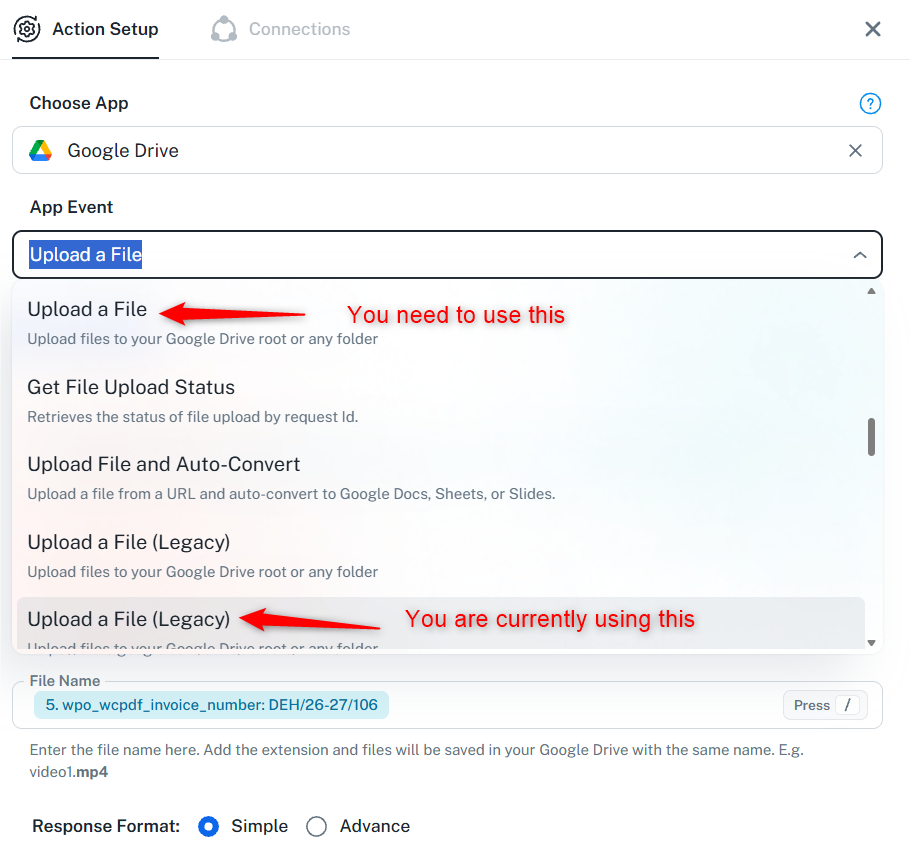
Hello,
It appears that you are using the legacy version of the Upload a File action step. Please try using the new version, which is also named Upload a File.