

• ⚠️ Important: This forum is being discontinued.

    We've moved community discussion to a new platform — better search, faster replies, and tighter integration with the Pabbly apps you already use.

    • Sunset date: 23 July 2026 (this forum will go offline after that)
    • Until then: Login remains available for 30 days
    • Continue the conversation: https://sales.pabbly.com/forum

ERP Next Oauth App

Status
Not open for further replies.

How to create Oauth App in ERP Next​

1. Login to your ERP Next account.
2. Navigate to integrations > Oauth Client .
3. Click on +Add Oauth Client button.
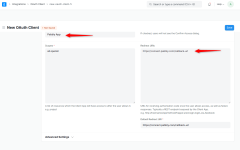
4. Provide App Name, Default Redirect URL & Redirect URL as https://connect.pabbly.com/callback-url shown in the image below.

erpnext1.png


5. Click on Save Button.
6. You will get App Client ID and App Client Secret.

erpnext2.png


7. Copy & paste the Client ID and Client Secret in the respective field while authentication as shown in the image below.

2023-07-13_13h21_38.png
 

Attachments

  • erpnext1.png
    erpnext1.png
    62.1 KB · Views: 285
Status
Not open for further replies.
Top