• Instructions to Ask a Question

    For any assistance, please click the "Ask a Question" button and select the Pabbly product for which you require support.

    We offer seven comprehensive applications designed to help you efficiently manage and grow your business:

    Our support team endeavors to respond within 24 business hours (Monday to Friday, 10:00 AM to 6:00 PM IST). We appreciate your understanding and patience.

  • Due to Holi celebrations, our team will have limited availability. While we’ll continue to monitor threads, responses may be slightly delayed. Normal operations will resume on Thursday, 5th March 2026.

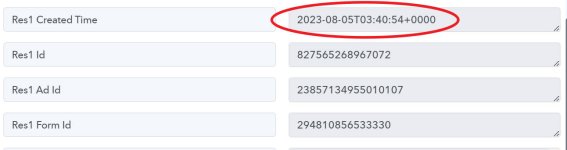
FB Ads Lead TIme Format Issues

Joker199

Member
Res1 Created Time
2023-08-05T03:40:45+0000


Question 1:
What does this time format mean?

Question 2:
How can converter the time format to DD-MM-YYYY HH:MM:SS?
 

Attachments

  • Snipaste_2023-08-05_15-19-35.jpg
    Snipaste_2023-08-05_15-19-35.jpg
    43.1 KB · Views: 140
P

Pabblymember11

Guest
Hey @Joker199

The field "Created Time 2023-08-05T03:40:45+0000" in the Facebook trigger response represents the timestamp when a particular item or content was created.

How can converter the time format to DD-MM-YYYY HH:MM:SS?
If you want to convert the time format to any other format you can use the "Date Time Formatter" action step.

1691221685600.png


Joker199

Member
Hey @Joker199

The field "Created Time 2023-08-05T03:40:45+0000" in the Facebook trigger response represents the timestamp when a particular item or content was created.


If you want to convert the time format to any other format you can use the "Date Time Formatter" action step.

View attachment 29719

Hey Supreme,
What should I do if I want the following workflow?

FB Ads Lead > Time Converter > Google Sheets
 

ArshilAhmad

Well-known member
Staff member
Please watch the video attached below to setup your workflow:

You can add a Date Time Formatter between both these steps.
 
Top