Google Sheets "New or Updated Spreadsheet Row" trigger is not firing automatically after Google Form submission
Status: Open · Asked by Vignesh .p on · 0 views
Hello Vignesh,
Thank you for sharing the detailed information.
To help us investigate this further, kindly share your Google Sheet with anushka.sahu@pabbly.com.
Once you've shared the sheet, please let us know. We'll review the Google Sheets add-on configuration and investigate why new Google Form submissions are not automatically triggering the workflow.
We look forward to your response.
Thanks & Regards,Anushka Sahu
Customer Support Associate
🌐 Pabbly.com
Hello Anushka,
I have shared the Google Sheet with Editor access to anushka.sahu@pabbly.com.
Kindly review the Google Sheets add-on configuration and let me know if any changes are required.
As discussed:
Google Form responses are added successfully to the sheet.
The workflow runs successfully when using Extensions → Pabbly Connect Webhooks → Send All Data.
However, new Google Form submissions are not automatically triggering the workflow.
Please let me know if you need access to my Pabbly workflow or any additional information.
Thank you.
Pabbly Support:
Hello Vignesh,Thank you for sharing the detailed information.To help us investigate this further, kindly share your Google Sheet with [email hidden] you've shared the sheet, please let us know. We'll review the Google Sheets add-on configuration and investigate why new Google Form subm
Hello Anushka,
I have shared the Google Sheet with Editor access to anushka.sahu@pabbly.com.
Kindly review the Google Sheets add-on configuration and let me know if any changes are required.
As discussed:
Google Form responses are added successfully to the sheet.
The workflow runs successfully when using Extensions → Pabbly Connect Webhooks → Send All Data.
However, new Google Form submissions are not automatically triggering the workflow.
Please let me know if you need access to my Pabbly workflow or any additional information.
Thank you.
Hello Vignesh,
We have reviewed your Google Sheet, and it appears to be working correctly. We also did not find any issues with the webhook configuration.
To continue our investigation, kindly share the Google Form associated with this sheet. This will allow us to test the complete flow from our end and identify the root cause.
Once we've reviewed the form, we'll update you with our findings and the appropriate resolution.
Thanks & Regards,Anushka Sahu
Customer Support Associate
🌐 Pabbly.com
Pabbly Support:
Hello Vignesh,We have reviewed your Google Sheet, and it appears to be working correctly. We also did not find any issues with the webhook configuration.To continue our investigation, kindly share the Google Form associated with this sheet. This will allow us to test the complete flow from our end a
Hello Anushka,
I have shared the Google Form with Editor access. Kindly review the complete Google Form → Google Sheets → Pabbly workflow and let me know if any additional information is required.
Thank you.
Hello Vignesh,
We thoroughly reviewed your setup and tested it from our end.
We found that when we submitted the Google Form, the workflow triggered automatically and executed successfully. The latest execution is also visible from our testing.
However, we observed that the form responses are being stored in a spreadsheet named "AI Resume Screening Responses" (Spreadsheet ID: 1pIKUQVVF43qnnU1thjcNnKdamHyzOXXX-X-qqsSb9ZI), whereas the spreadsheet you shared with us is an Untitled Spreadsheet, which is different.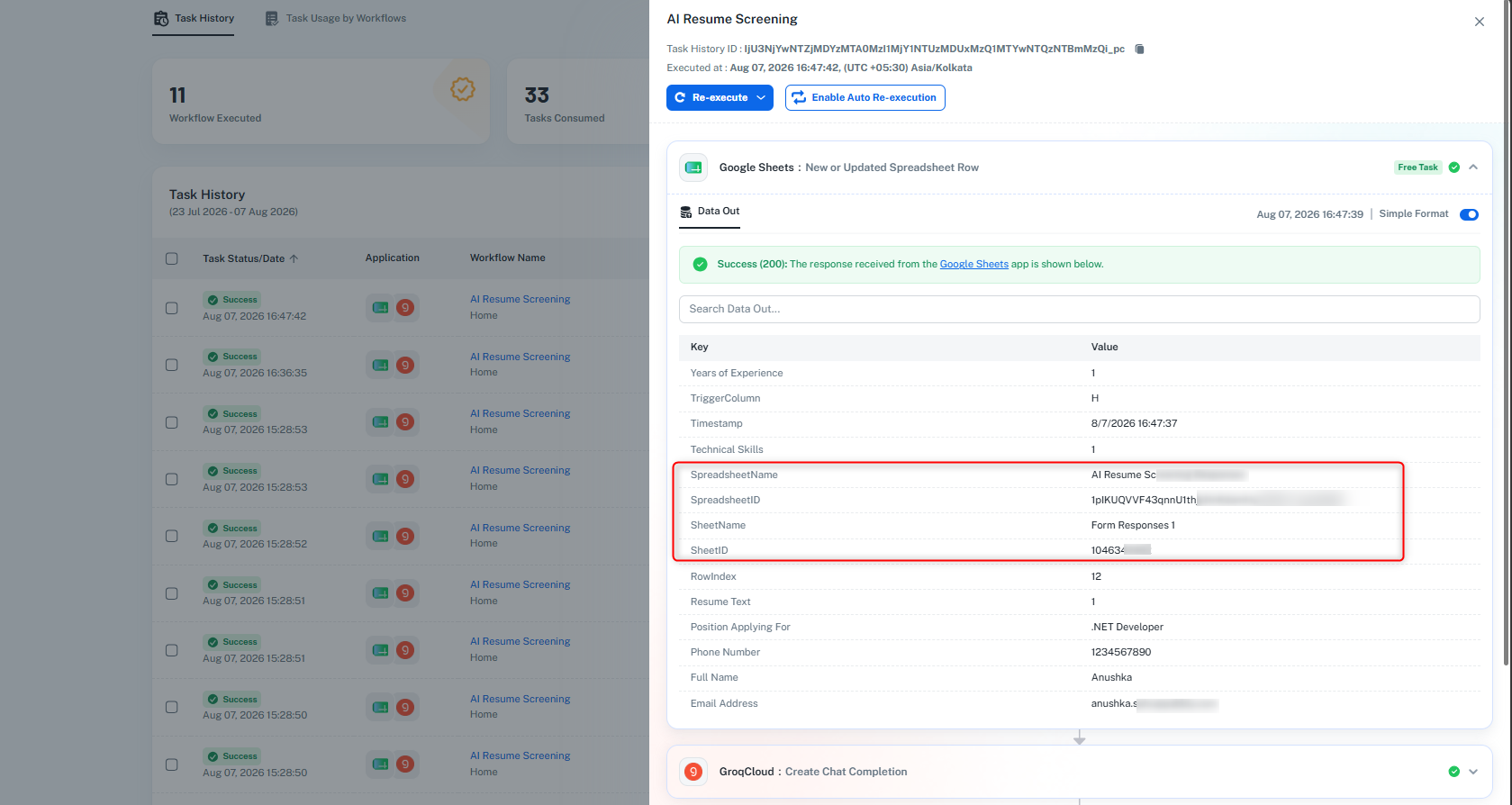
This suggests that your Google Form is currently linked to a different spreadsheet than the one you shared with us. It is possible that the Pabbly webhook URL has been configured in a two different spreadsheets.
Could you please verify which spreadsheet is actually receiving the form responses? If there is another spreadsheet named "AI Resume Screening Responses", kindly check that once and let us know.
From our testing, the workflow is functioning correctly, and you can also verify the latest execution performed by anushka.sahu@pabbly.com in your workflow history.
We look forward to your confirmation.
Thanks & Regards,Anushka Sahu
Customer Support Associate
🌐 Pabbly.com
Pabbly Support:
Hello Vignesh,We thoroughly reviewed your setup and tested it from our end.We found that when we submitted the Google Form, the workflow triggered automatically and executed successfully. The latest execution is also visible from our testing.However, we observed that the form responses are being sto
Hello Anushka,
Thank you very much for your support and for taking the time to investigate the issue thoroughly.
Your findings helped me identify that the Google Form was linked to a different spreadsheet. After correcting that, the workflow is now triggering automatically and everything is working as expected.
I truly appreciate your patience, guidance, and prompt assistance throughout the troubleshooting process.
Thank you once again for your excellent support.
Best Regards,
Vignesh P