How can I make a filter in my Workflow based on lower then 60 and equal/higher then 60?
Status: Open · Asked by Gea Simons on · 0 views
I have the field, but I can not choose less then or higher then as option, only Equals/Not Equals to/Contains/Does not contain.
How can I make this work without having to make 60 conditions?
Kind regards,
Gea
Hello Gea,
In the Filter by Pabbly step, numerical conditions like Greater Than and Less Than are available!
To find and apply them:
Click on the Select Filter Type dropdown menu inside your Filter step.
Scroll down towards the bottom of the condition list.
You will see the numerical conditions listed there:
Less Than
Greater Than
Less Than or Equal To
Greater Than or Equal To
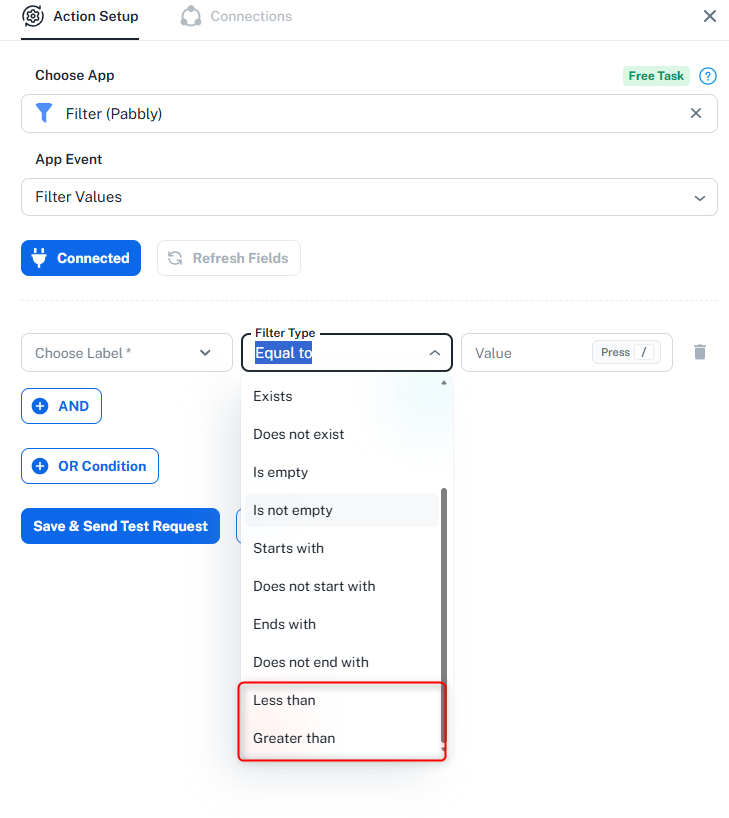
Select Less Than (and enter 60 in the Value field) or Greater Than or Equal To (60) as per your requirement. This allows you to set up the logic instantly without creating multiple conditions.
Please try scrolling down the dropdown list, and let us know if you need any further help!
Thanks & Regards,
Hrishabh
Customer Support Associate
🌐 Pabbly.com
👉 Rate your support